Image copyright misuse is a costly risk for businesses, with penalties ranging from $3,000 to $150,000 per image under U.S. law. AI tools now offer automated solutions to identify and address copyright issues, saving time and money while reducing legal exposure. These tools scan websites, analyze images against massive databases, and flag potential risks, helping businesses shift from reactive responses to proactive management.
Key Takeaways:
- AI tools automate copyright checks, eliminating the need for manual image tracking.
- Features to prioritize: full-site scanning, advanced AI analysis (e.g., EXIF data, face/logo detection), and risk scoring.
- Integration options (e.g., WordPress plugins, APIs, Zapier) streamline compliance workflows.
- Tools like PicDefense stand out for transparency, detailed features, and pricing clarity.
- PicDefense: Offers automated scanning, risk scoring, and integrations like WordPress plugins and Zapier.
- CopyChecker AI, ImageRights Pro, PixDetect, and SafeImage AI: Limited public details; contacting vendors is necessary for specifics.
Conclusion: Managing copyright risks with AI tools can prevent expensive legal claims while ensuring compliance. Start by auditing your image library and selecting a tool that fits your workflow and budget.
How to Choose AI Copyright Risk Tools
Picking the right AI copyright risk tool is essential to avoid hefty infringement claims. In the U.S., statutory damages for copyright violations can range from $3,000 to $150,000 per image, so selecting a tool that offers robust protection is a must.
Start by ensuring the tool provides Comprehensive Automated Scanning. This feature is the backbone of any effective copyright protection system. The tool should automatically scan your entire website, creating a thorough inventory of all images. Continuous monitoring is key - it ensures that new images are tracked as they’re added and flags older ones that might pose risks over time.
Another critical feature is Advanced AI Analysis. Basic tools may only scratch the surface, but advanced solutions dig deeper. Look for tools that analyze EXIF data, detect faces, landmarks, and logos, and perform reverse image searches. The most effective systems compare your images against vast databases - some with over 73 billion indexed images - to identify duplicates, edits, or stock photo origins [1].
Actionable Risk Scoring and Recommendations are what turn raw data into usable insights. A good tool doesn’t just flag potential issues; it provides risk scores along with clear steps for resolving them. This might include tracing image sources, suggesting copyright-free alternatives, and offering detailed documentation to explain why an image could be problematic.
Integration Options are also crucial, especially for businesses managing multiple websites or web agencies handling client sites. Seamless integration ensures the tool fits smoothly into your existing workflow. For example, PicDefense highlights its WordPress plugin, API access, and Zapier integration as solutions for managing copyright compliance across multiple sites:
"For Web Agencies: Our WordPress plugin, API access, and Zapier integration simplify managing copyright compliance across multiple sites." – PicDefense [1].
Tools with WordPress plugins allow you to address issues directly within your content management system. API access supports custom integrations, and platforms like Zapier and Make.com offer automation options. Make.com, for instance, connects over 3,000 pre-built apps and 400+ AI integrations, helping businesses streamline their tech stacks and respond quickly to market demands [2].
Don’t overlook U.S. Legal Considerations. Fair use provisions in U.S. copyright law can create gray areas that even the best AI tools can’t definitively resolve. The ideal tool should flag potential fair use scenarios and recommend when legal advice might be necessary. It should also focus on identifying registered copyrights, which carry higher penalties, and provide documentation to demonstrate your good-faith compliance efforts.
Another must-have is Documentation and Compliance Tracking. This feature is invaluable during disputes. The tool should maintain detailed records of image sources, purchase dates, and licensing agreements. These records can be a lifesaver when copyright holders use archive.org timestamps to challenge your ownership claims years later. Organized documentation supports proactive risk management and strengthens your defense against potential claims.
Finally, consider the tool’s pricing and scalability. Some tools offer one-time scan credits, typically costing $0.07–$0.20 per image, while others provide ongoing monitoring plans. Decide whether you need continuous monitoring or occasional audits based on how frequently you add new content.
Choosing the right tool isn’t just about avoiding legal trouble - it’s about shifting from reactive damage control to proactive risk management. By prioritizing features like actionable insights, integration options, and compliance tracking, you’ll be better equipped to handle copyright challenges before they escalate. In the next section, we’ll dive into a detailed evaluation of PicDefense as a potential solution.
1. PicDefense
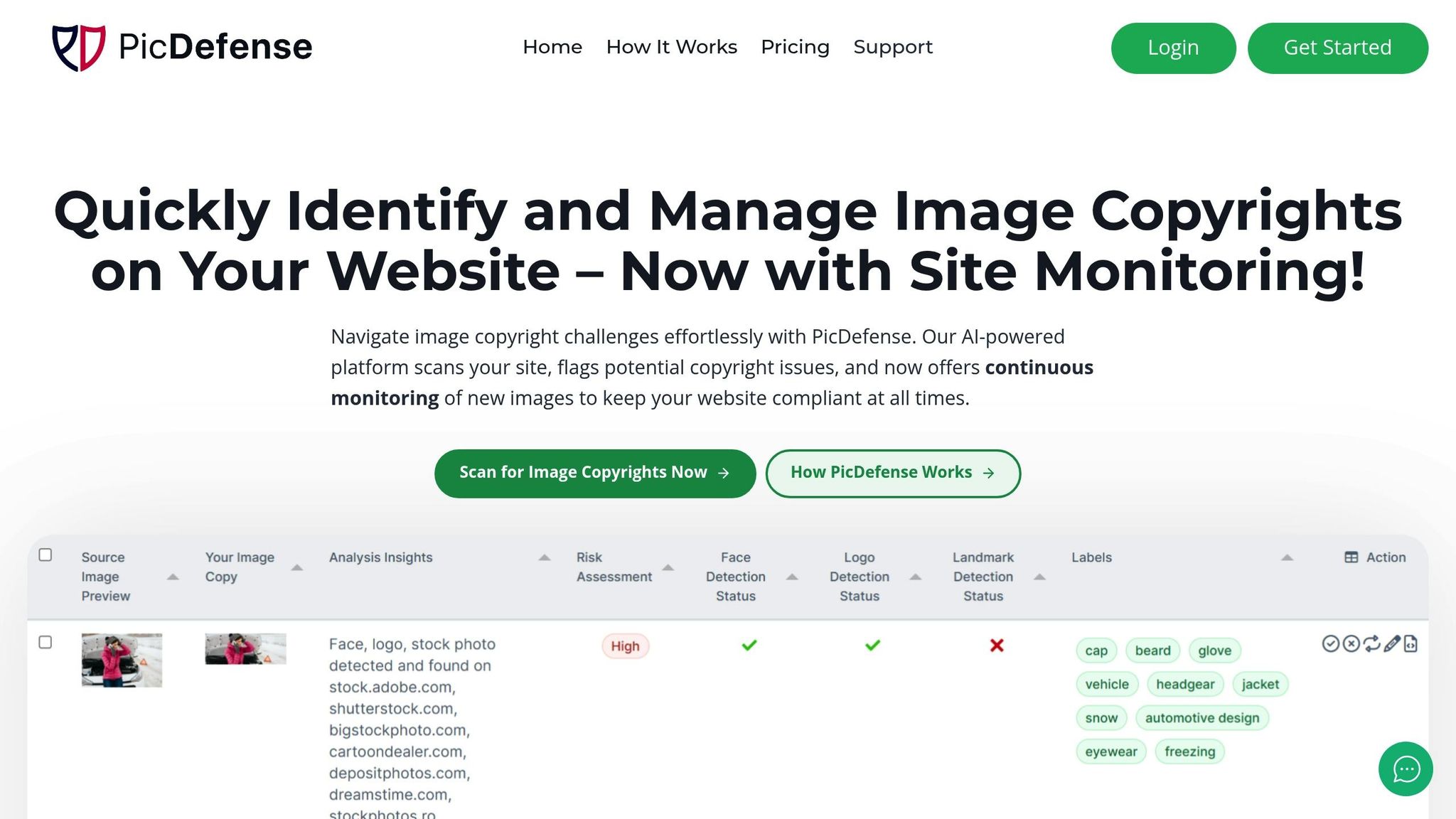
PicDefense is an AI-driven platform designed to help website owners stay ahead of copyright issues by managing image compliance effectively. By combining automated scanning tools with detailed risk analysis, it offers a proactive solution for handling potential copyright challenges. Here's a closer look at how PicDefense works.
Automated Image Scanning & Inventory Creation
With PicDefense, you can automatically create an inventory of every image on your website - just by entering your URL. This ensures no image is missed during compliance checks.
For $30 per month, the Site Monitoring feature includes 150 image analyses, and any unused credits roll over indefinitely [1]. Weekly scans keep an eye on newly uploaded images, with the first scan setting a baseline and future scans focusing on recent additions. To simplify ongoing reviews, users can whitelist images that have been verified, meaning those images remain approved across all instances on the site.
AI-Powered Copyright Risk Analysis
PicDefense’s AI engine takes image analysis a step further by comparing your site’s images against extensive databases. This includes spotting manipulated or altered content to identify copyright concerns. The platform also uncovers essential details about image ownership and history.
Its advanced capabilities can detect faces, landmarks, and logos, all of which may influence risk scores due to privacy, trademark, or personality rights. Additionally, it flags images that might originate from stock photo libraries and uses backlink analysis to trace the source of an image. This helps users determine if proper licensing is required.
Integration Capabilities (APIs, Plugins, Automation Tools)
PicDefense integrates seamlessly into various workflows. A WordPress plugin allows for direct management of image copyright compliance within WordPress sites. For more customized needs, API access supports integrations with existing systems, and Zapier compatibility enables automation of compliance tasks. To ensure complete protection, the platform recommends starting with the web-based scanner, which reviews all publicly visible images and supports continuous weekly monitoring for new additions [1].
Actionable Risk Scoring & Reporting
PicDefense doesn’t just flag potential issues - it turns data into actionable insights. Each image is assigned a risk score, helping users prioritize and address copyright concerns efficiently. Images are also tagged with keywords to improve organization and searchability.
When risks are identified, the platform provides backlink analysis to suggest the source of the image and offers recommendations for securing proper licenses. If replacements are needed, it even suggests copyright-free alternatives.
For those needing additional scans beyond the monthly allocation, pricing is flexible: $0.15 per image or credit bundles like 500 images for $85 or 1,000 images for $150 [1]. This pricing structure works for both ongoing monitoring and one-off audits.
"PicDefense automates image compliance by scanning and monitoring your website for potentially copyrighted images." - PicDefense [1]
2. CopyChecker AI
Currently, there isn't much verified information about the features and functionality of CopyChecker AI when it comes to assessing copyright risks. To get an accurate understanding of what this tool provides, it's best to consult the official resources from the vendor.
Even though specific details aren't available right now, keeping up with updates from the vendor is essential for effective copyright risk management. Next, check out our detailed review of ImageRights Pro to explore another tool in this space.
3. ImageRights Pro

Information about ImageRights Pro's features is somewhat scarce, particularly when it comes to integration options. It's not clear whether the platform offers support for APIs, plugins, or automation tools that could help simplify workflows - something that's often crucial for managing copyright risks efficiently.
For more details on pricing, features, and how the platform can be implemented, it's best to reach out directly to the vendor.
Up next, we'll take a look at PixDetect, which offers more transparent information about its integration capabilities.
sbb-itb-59d21f2
4. PixDetect

After examining ImageRights Pro, let’s take a look at PixDetect. This tool offers a basic approach to copyright risk analysis, but the specifics of how it operates are somewhat unclear.
AI-Powered Copyright Risk Analysis
PixDetect claims to use AI for analyzing image metadata and detecting potential infringements. However, the exact methodology behind its analysis isn't well-documented. To truly understand its capabilities in managing copyright risks, businesses would need to reach out to the vendor directly.
Integration Capabilities
When it comes to integration, information is sparse. There's little clarity on whether PixDetect supports APIs, plugins, or other tools that could streamline it into existing workflows. This lack of transparency makes it hard to gauge how easily it could fit into a company’s current processes.
Actionable Risk Scoring & Reporting
The tool also mentions risk scoring and reporting features, but details about these functionalities are not readily available. Again, users would need to contact the vendor to get a full picture of what’s offered.
Overall, PixDetect’s public documentation leaves many questions unanswered. For a deeper understanding of its features, prospective users should connect with the vendor. With these gaps in mind, let’s move on to SafeImage AI, which provides more clarity about its copyright risk assessment tools.
5. SafeImage AI
There's not much publicly available information about SafeImage AI's features, how it works, or its integration options. Details like whether it supports API access, plugins, or how it calculates risk scores are currently undocumented. For specifics, organizations will need to reach out directly to the vendor. Similar to other tools we've looked into, the lack of documentation makes it hard to fully understand SafeImage AI's capabilities. Up next, we'll compare this tool to other AI risk scoring solutions.
Tool Comparison Chart
When it comes to copyright risk management, a side-by-side comparison of key features reveals how tools stack up in terms of scanning capabilities, risk analysis, and integration options. Here's an overview:
| Feature | PicDefense | CopyChecker AI | ImageRights Pro | PixDetect | SafeImage AI |
|---|---|---|---|---|---|
| Automated Full-Site Scanning | ✅ Complete website crawling | ❓ Not provided | ❓ Not provided | ❓ Not provided | ❓ Not provided |
| AI-Powered Risk Analysis | ✅ EXIF, faces, logos, landmarks | ❓ Not provided | ❓ Not provided | ❓ Not provided | ❓ Not provided |
| API Access | ✅ Full API integration | ❓ Not provided | ❓ Not provided | ❓ Not provided | ❓ Not provided |
| WordPress Plugin | ✅ Dedicated plugin with auto-replace | ❓ Not provided | ❓ Not provided | ❓ Not provided | ❓ Not provided |
| Automation Integration | ✅ Zapier & Make.com integration | ❓ Not provided | ❓ Not provided | ❓ Not provided | ❓ Not provided |
| Risk Mitigation Features | ✅ Alternative image suggestions | ❓ Not provided | ❓ Not provided | ❓ Not provided | ❓ Not provided |
| Compliance Reporting | ✅ Comprehensive risk reports | ❓ Not provided | ❓ Not provided | ❓ Not provided | ❓ Not provided |
| Continuous Monitoring | ✅ Continuous monitoring | ❓ Not provided | ❓ Not provided | ❓ Not provided | ❓ Not provided |
This chart makes one thing clear: PicDefense offers a much more transparent and detailed feature set compared to its competitors. Its tools and integrations are purpose-built for proactive copyright compliance, making it a standout choice.
Why PicDefense Stands Out
Pricing Transparency: PicDefense is upfront about its costs, starting at $20 for scanning 100 images and $30 per month for ongoing monitoring. Meanwhile, pricing for other tools remains unavailable, leaving potential users in the dark.
Integration Options: PicDefense integrates seamlessly with existing workflows. It offers:
- Full API access for custom workflows
- A dedicated WordPress plugin with auto-replace functionality
- Automation options through Zapier and Make.com
Advanced AI-Driven Analysis: PicDefense leverages AI to perform in-depth risk assessments, analyzing:
- EXIF metadata
- Facial recognition
- Logo and landmark detection
- Reverse image searches
These capabilities ensure a thorough evaluation of potential copyright risks, providing businesses with actionable insights. In comparison, other tools fail to disclose such advanced features.
With its detailed feature set, transparent pricing, and robust integrations, PicDefense emerges as a practical and reliable solution for businesses aiming to stay ahead in image copyright compliance.
Conclusion
For businesses in the U.S., AI-powered copyright risk scoring tools are becoming a must-have. With copyright infringement claims ranging from $3,000 to $150,000 per image, these tools can save companies from staggering legal expenses.
By addressing the risks discussed earlier, these tools help businesses avoid hefty legal fees and simplify copyright management. Unlike outdated manual checks, AI solutions provide clear financial benefits. For instance, spending $20 to scan 100 images or $30 a month for ongoing monitoring is a small price compared to the tens of thousands of dollars a single copyright claim could cost in legal fees and settlements.
Beyond cost savings, these tools boost efficiency by eliminating the need for manual tracking and ensuring proper documentation of image ownership and licensing. Instead of scrambling to find proof of licensing when faced with a copyright claim, businesses can maintain well-organized, audit-ready records.
Choosing the right tool is key to success. Companies should assess their specific needs - like compatibility with their website platform, the number of images they manage, how often scans are required, and existing automation systems. The right solution can seamlessly integrate into your workflow and strengthen your compliance efforts.
Don’t wait for a problem to arise. Copyright compliance isn’t just a possibility - it’s an inevitability. Even businesses that rely solely on licensed stock photos can face risks if they can’t locate original purchase records years later. Start by auditing your current image library and then implement continuous monitoring to stay compliant as your digital footprint expands.
The tools reviewed here each have unique features, but the most important step is simply taking action. Look for a solution that offers clear features, transparent pricing, and reliable support. Your digital assets are just as valuable as any other company resource - protect them accordingly.
FAQs
What features should I prioritize in an AI tool for managing image copyright risks?
When selecting an AI tool to manage image copyright risks, focus on tools that provide thorough image analysis. Key features to look for include the ability to analyze EXIF metadata, recognize faces, logos, and landmarks, and compare images against extensive databases to flag potential copyright concerns.
Additionally, prioritize tools with reverse image search to discover where images are being used online and backlink analysis to trace their origins. Features like generating detailed risk scores, conducting full-site scans, or analyzing images in bulk can save time and improve efficiency. Tools that offer actionable insights and compliance reports are especially useful for addressing risks and ensuring proper copyright management.
How can AI tools like PicDefense help businesses manage image copyright risks effectively?
AI tools like PicDefense make managing copyright for images much easier. These tools automatically scan websites to catalog and analyze all images. By leveraging advanced AI, they can identify potential copyright issues by examining image metadata, spotting visual elements like faces or logos, and even tracing the image's origins through backlinks.
With thorough risk evaluations and practical recommendations, businesses can tackle high-risk images, swap them out for safer options, and stay compliant with copyright laws. This proactive strategy reduces legal risks and simplifies image management, particularly for websites loaded with visual content.
What legal risks could arise from not managing image copyright effectively?
Failing to handle image copyright correctly can result in serious legal troubles. These might include receiving copyright demand letters, facing hefty fines, or even dealing with lawsuits. For small to mid-sized businesses, these challenges can be especially tough, as they often don’t have the resources to navigate such situations effectively.
AI tools can play a key role in managing copyright risks. They help spot and address potential problems early, keeping your website compliant and safeguarding it from unnecessary legal complications.
Protect your website from image copyright claims
PicDefense scans your entire website, identifies image risks, and stores proof of compliance — so you never get caught off guard.