Risk Forensics: Dual-Engine AI to Triage Your Liabilities
Don't waste time manually reviewing thousands of safe images. Our forensic engine automatically calculates an evidence-based risk score for every asset in your inventory, filtering the noise so your team can focus strictly on exposure.
Scans against
82+ Billion Images
The “Dual-Engine” Tech Stack
Finding copyright risk requires more than a simple reverse-image search. PicDefense utilizes a dual-engine tech stack that combines industry-leading databases with advanced computer vision to provide true forensic-grade intelligence.
Reverse Search API Integration
We scan your assets against 82+ Billion indexed images across the web, identifying exact visual matches within major commercial stock libraries and enforcement databases.
Vision AI
We use visual AI to find edited or cropped images. Even if your web developer flipped, resized, or applied a filter to a protected image, our Vision AI can still identify the underlying source asset.
Logo & Landmark Detection
Our AI automatically flags images containing protected corporate logos, recognizable faces, or trademarked landmarks that often require additional model or property releases.
Stock Watermark Detection
We flag the semi-transparent “sample,” “preview,” and “do not copy” overlays and embedded agency credit lines that signal an image came from a paid library. A visual model and a text read work together to surface the watermark and point to the library it likely came from—across Getty, Shutterstock, Dreamstime, and roughly 50 other providers—even when the EXIF metadata has been stripped.
Text-in-Image (OCR) Extraction
We read the visible text baked into your image pixels—embedded credit lines, copyright notices, and “sample” or “proof” overlays—and make it searchable and filterable. This is origin evidence a normal HTML or alt-text crawl never sees, because it lives in the pixels, not the page source.
Evidence-Based Risk Scoring
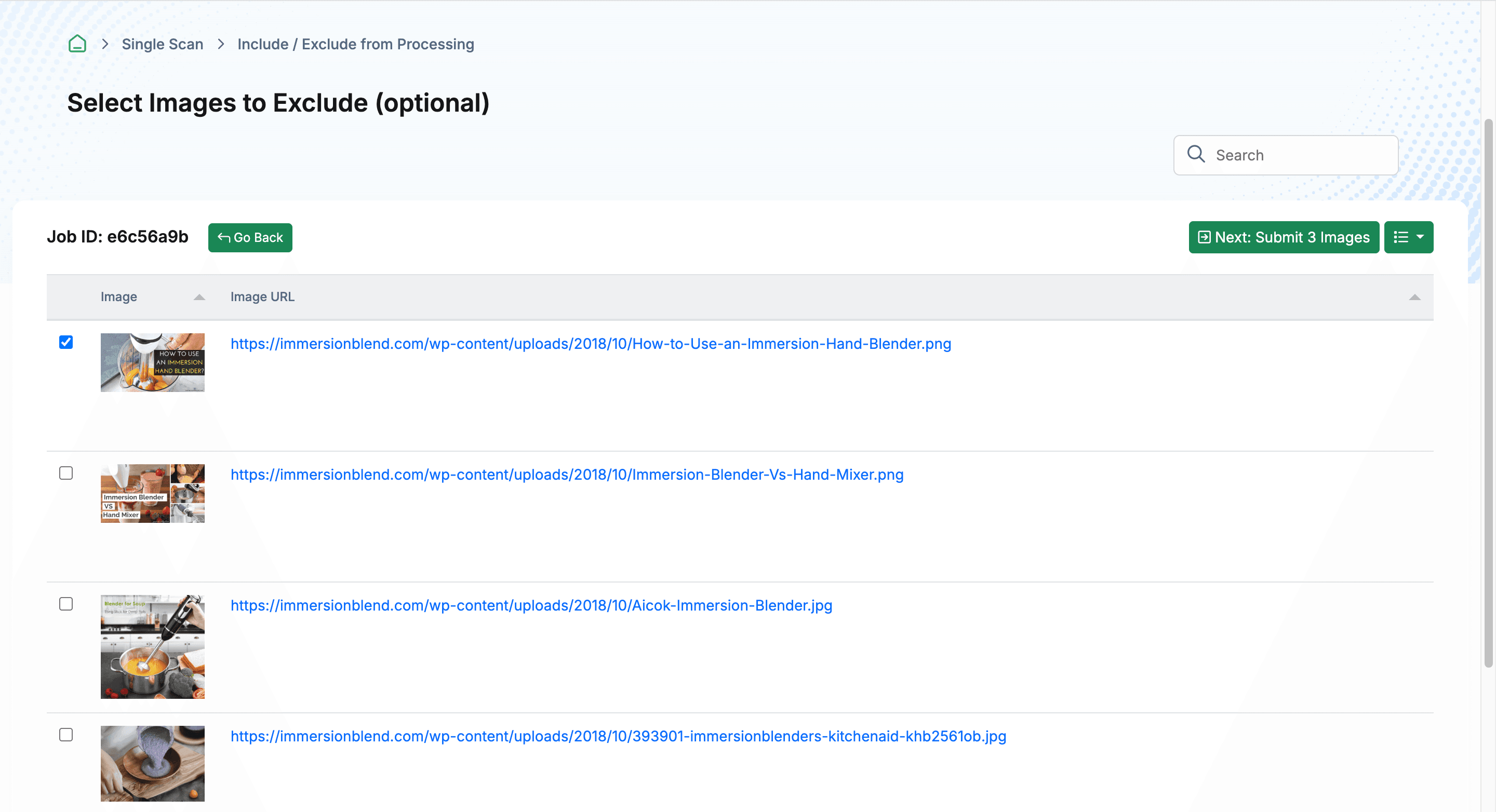
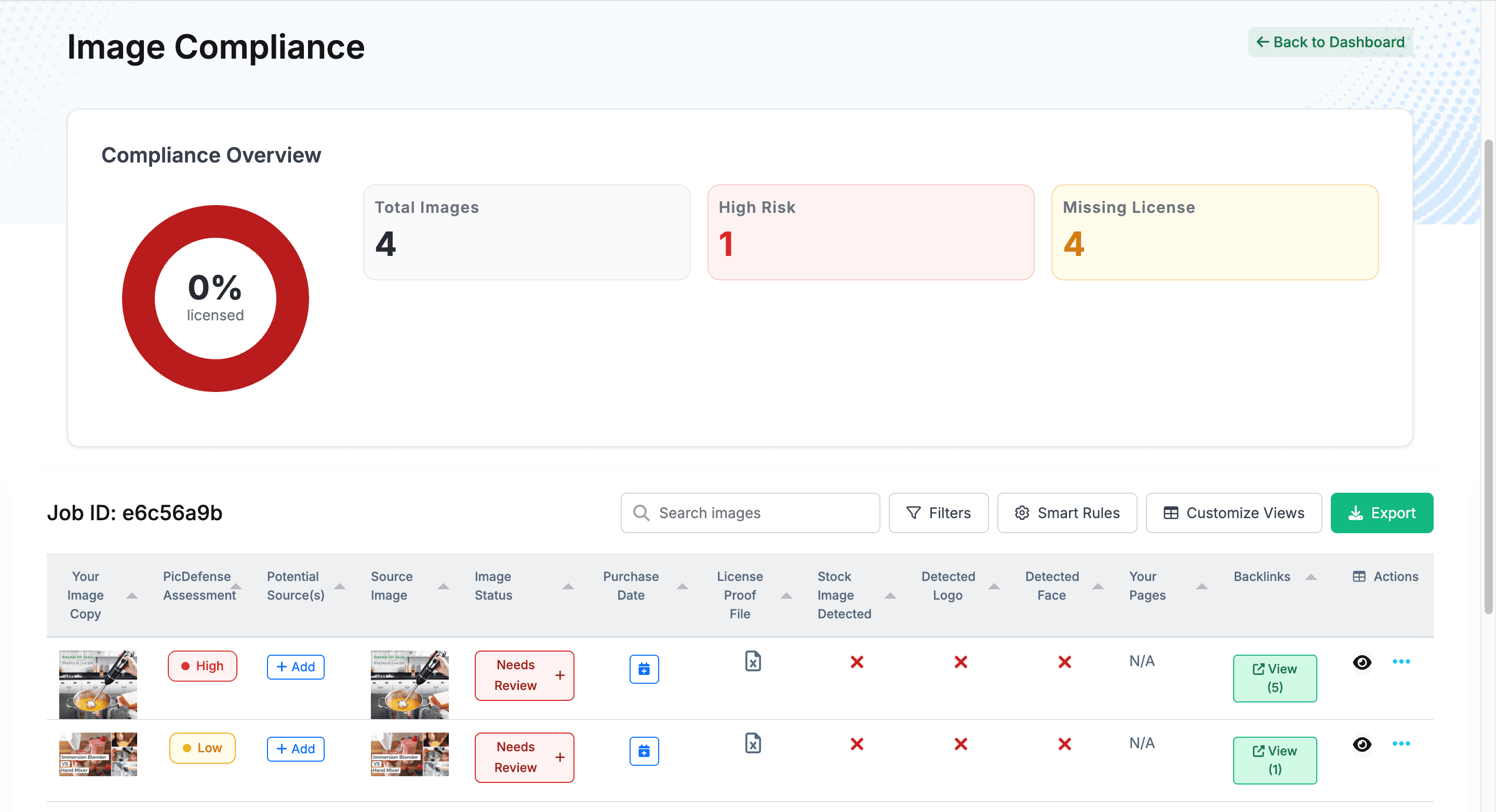
How do you prioritize a compliance audit of 5,000 images? You let the intelligence engine do the triage. We explain exactly how risk is calculated so you can build internal SOPs around the data.
Matches a known commercial stock library. No license proof found in your Vault. Immediate attention required.
Partial match or ambiguous source. Metadata suggests commercial origin but no definitive stock library match.
Source appears to be a free-use library or original content. Minor verification recommended.
Confirmed free-use source, original content, or license proof already uploaded to the Proof Vault.
Evidence-based
Transparent Scoring
How Risk is Calculated
We show you the evidence behind every score. No black boxes. No “magic AI.” Every risk assessment is backed by verifiable data your team can act on.
Stock Detection
If an image on your site matches a known, paid stock database (like Getty Images or Shutterstock) and you haven’t uploaded a license to your Proof Vault, it is immediately flagged as High Risk.
Metadata Extraction
We dig into the hidden EXIF data of your files to uncover embedded copyright tags, camera models, and author names that enforcement bots use to prove ownership.
Source Intelligence
We don’t just tell you an image is risky; we show you the likely source, allowing you to instantly determine if the asset was pulled from a safe repository or a highly litigious one.
Watermark & Embedded Text
Beyond hidden metadata, we read the evidence sitting in plain sight: semi-transparent stock watermarks and the credit lines, copyright notices, and stock-ID strings burned into the image itself. These pixel-level signals survive even after EXIF data is stripped, helping you spot the likely source library and triage your highest-exposure images first.
Moving from “Risk” to “Verified”
The goal of the Risk Forensics engine is not to scare you; it is to give you a prioritized work queue.
Filter by Risk
View only High Risk items
Investigate Source
Check source intelligence
Upload Proof
Attach license to Proof Vault
Status: Verified
Compliance confirmed
Frequently Asked Questions
Common questions about Risk Forensics and image analysis.
How accurate is the risk scoring?
Our dual-engine approach combines reverse image search (which checks against billions of indexed images) with Vision AI (which detects manipulated versions). This produces significantly more accurate results than either method alone. We explicitly show you the evidence behind each score so you can verify the assessment.
Can edited or cropped images still be detected?
Yes. Our Vision AI is specifically designed to detect images that have been flipped, resized, cropped, color-adjusted, or filtered. Enforcement agencies like PicRights use the same kind of technology to find infringements—our engine matches their capability to level the playing field.
What happens after images are scored?
Your scored inventory becomes a prioritized work queue. Filter by "High Risk" to focus on the images that need immediate attention. For each flagged image, you can investigate the source, locate or purchase the license, upload proof to the Proof Vault, and update the compliance status.
Does PicDefense detect faces and logos?
Yes. Our Vision AI flags images containing recognizable faces, corporate logos, and trademarked landmarks. These assets often require additional model or property releases beyond standard stock licenses, representing a separate category of legal exposure.
Can PicDefense detect stock watermarks on my images?
Yes. We use two signals together—a visual model that spots semi-transparent overlays and a text read of any embedded wording—to flag stock-agency and copyright watermarks across roughly 50 providers, including Getty, Shutterstock, and Dreamstime. When the watermark text is readable, we also surface the likely source library so you can prioritize that image. Treat a detected watermark as strong origin evidence to investigate, not as a verdict that an image is unlicensed. The named source is inferred from the text we could read in the image—it is a best-effort identification, not verified provenance—and very small, low-contrast, or image-only marks can be missed.
What does the Text (OCR) detection find?
It extracts the text rendered inside your image pixels—embedded credit lines like “© John Smith Photography” or “Image: Getty,” “sample” and “proof” overlays, copyright notices, and stock-ID strings—and makes that text searchable and filterable in your report. Because this text lives in the pixels rather than the page HTML or alt text, a standard site audit never sees it, and it often survives even after metadata is removed. The presence of text is a forensic signal to act on, not proof of infringement; stylized, rotated, or low-resolution text may be missed or misread.
Continue the Compliance Lifecycle
Risk Forensics connects to every other pillar of the PicDefense platform.
Triage Your Visual Estate Today.
Let our AI do the heavy lifting. Run a forensic scan to instantly score the risk of your existing image inventory.
Legal Disclaimer
PicDefense is a technology platform, not a law firm. Risk Forensics provides automated, evidence-based copyright risk assessments using reverse image search and computer vision. Risk scores are informational and do not constitute legal advice. If you are unsure of your legal standing regarding a copyright claim, we strongly recommend consulting an Intellectual Property attorney.