The Proof Vault: Your Image Compliance System of Record
Risk is a filter, but proof is the product. Stop relying on scattered spreadsheets and messy Google Drives. Centralize your licenses, purchase receipts, and attribution data in one secure, forensic ledger.
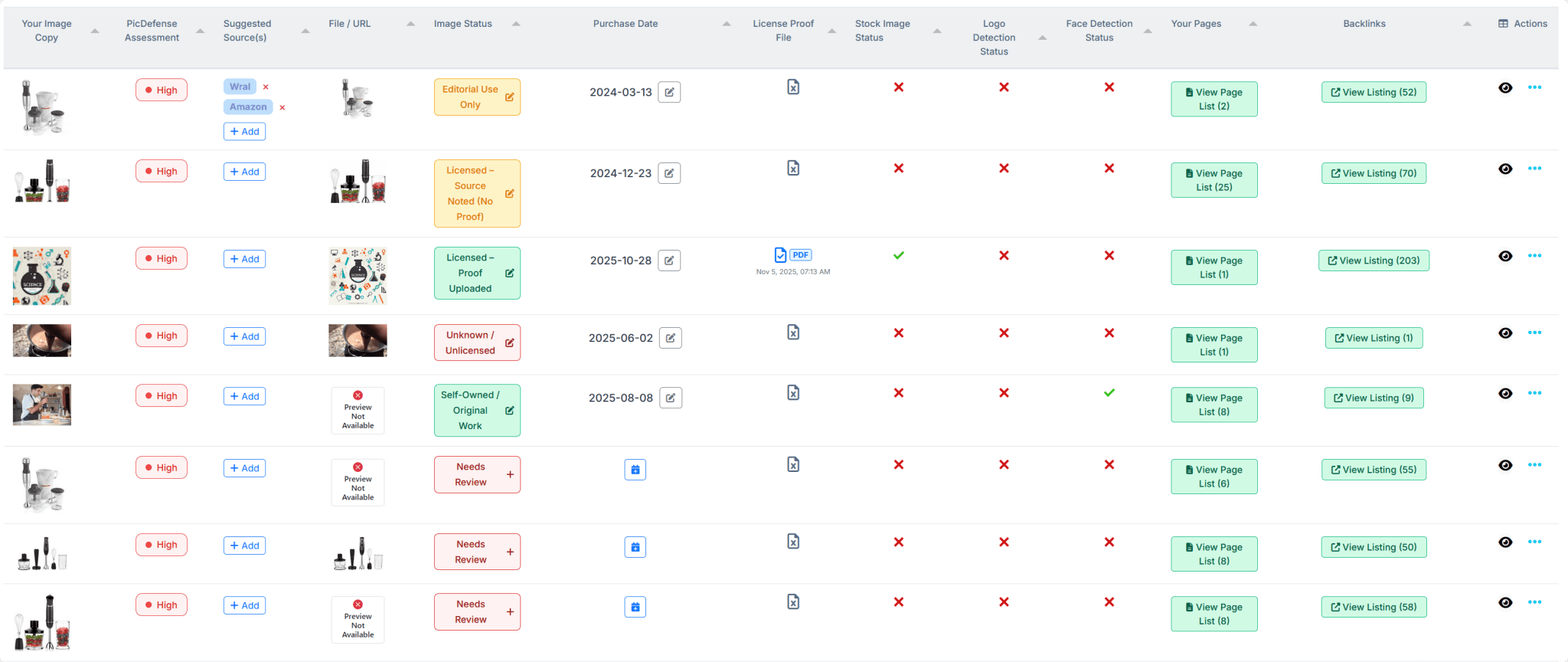
Every image tracked with
Forensic Proof Attached
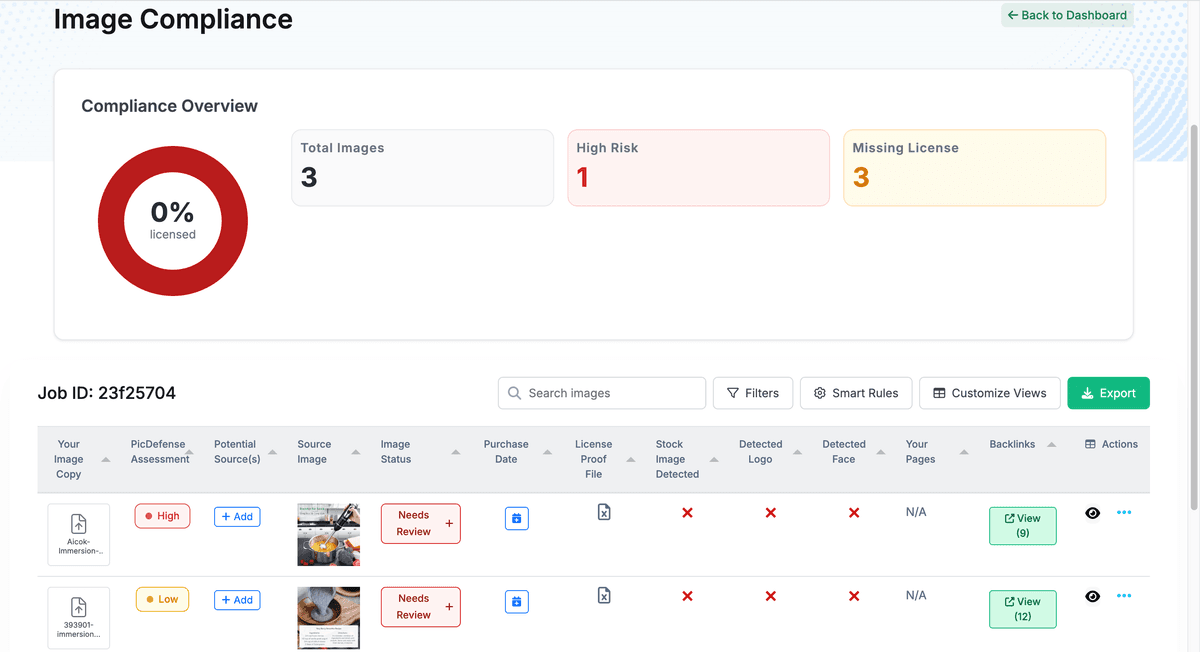
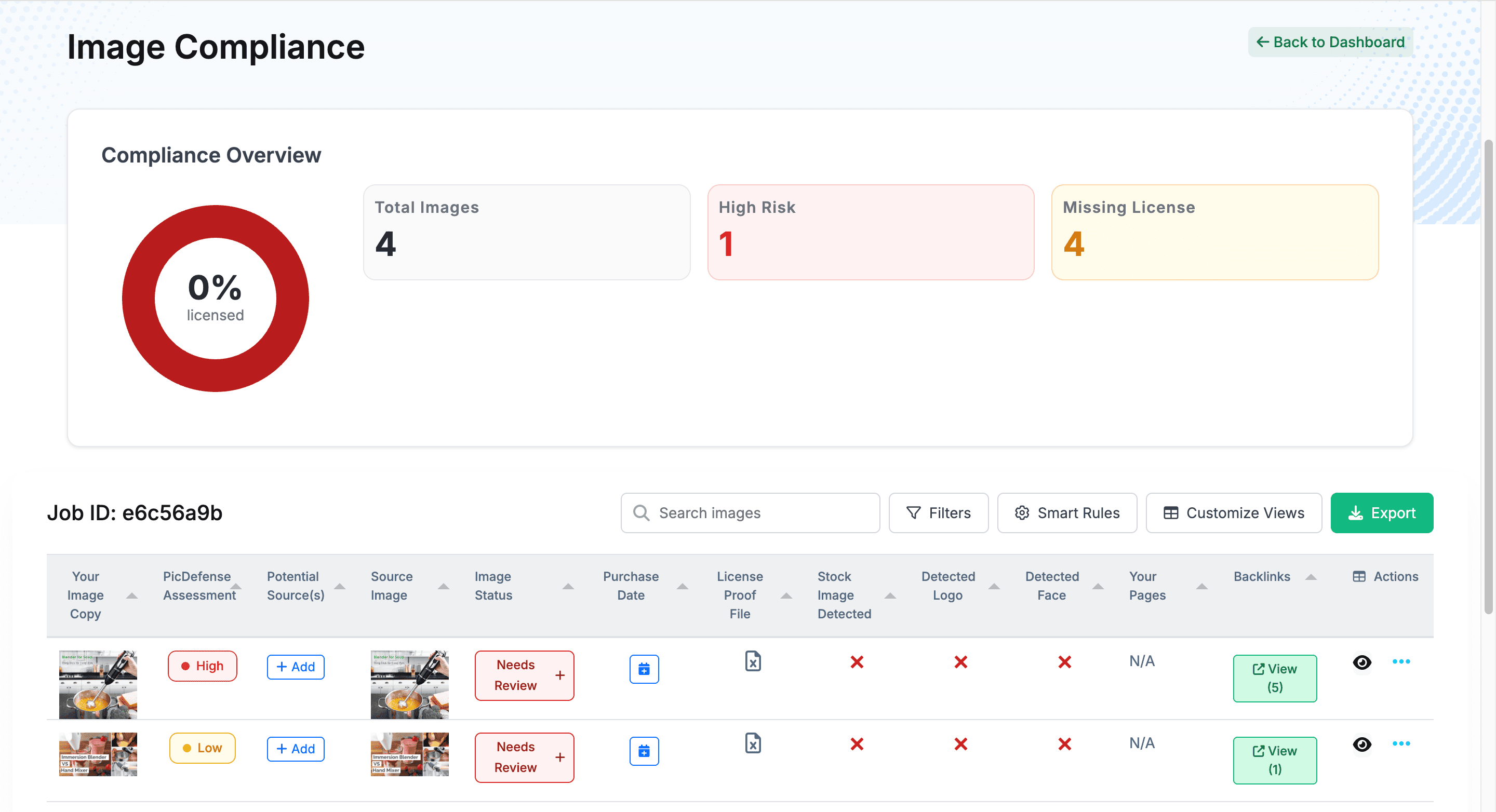
The Master Inventory Ledger
You cannot defend what you haven't indexed. The Proof Vault acts as your single source of truth for every visual asset across your entire digital estate.
Global Visibility
View every image, its URL location, and its current compliance status in one unified dashboard.
The "Unknown Unknowns"
Instantly identify rogue assets uploaded by past developers, guest authors, or unverified third-party plugins.
Source Tracking
See exactly which pages are hosting which images to understand your total exposure footprint.
Shared Reports & Chain of Custody
Share a single report with a client or outside counsel and they get a full editable view, not a static snapshot. Every change records who edited the row and when, so your ledger carries a documented, time-stamped history of who touched each asset.
The “Verified Proof” Workflow
PicDefense doesn't just find problems; we provide the Vault to store the solutions. When you purchase a stock photo or acquire a license, your compliance workflow isn't finished until the proof is securely attached to the asset.
1Upload & Attach
Directly upload PDF receipts, license agreements, or screenshots of free-use terms (like Unsplash or Pexels) to the specific image record.
2Change the Status
Move high-risk assets from the red "Needs Review" status to the green "Licensed – Proof Uploaded" status.
3Immutable Records
Your proof is locked to the asset. If an enforcement bot flags the image three years from now, your evidence is already waiting.
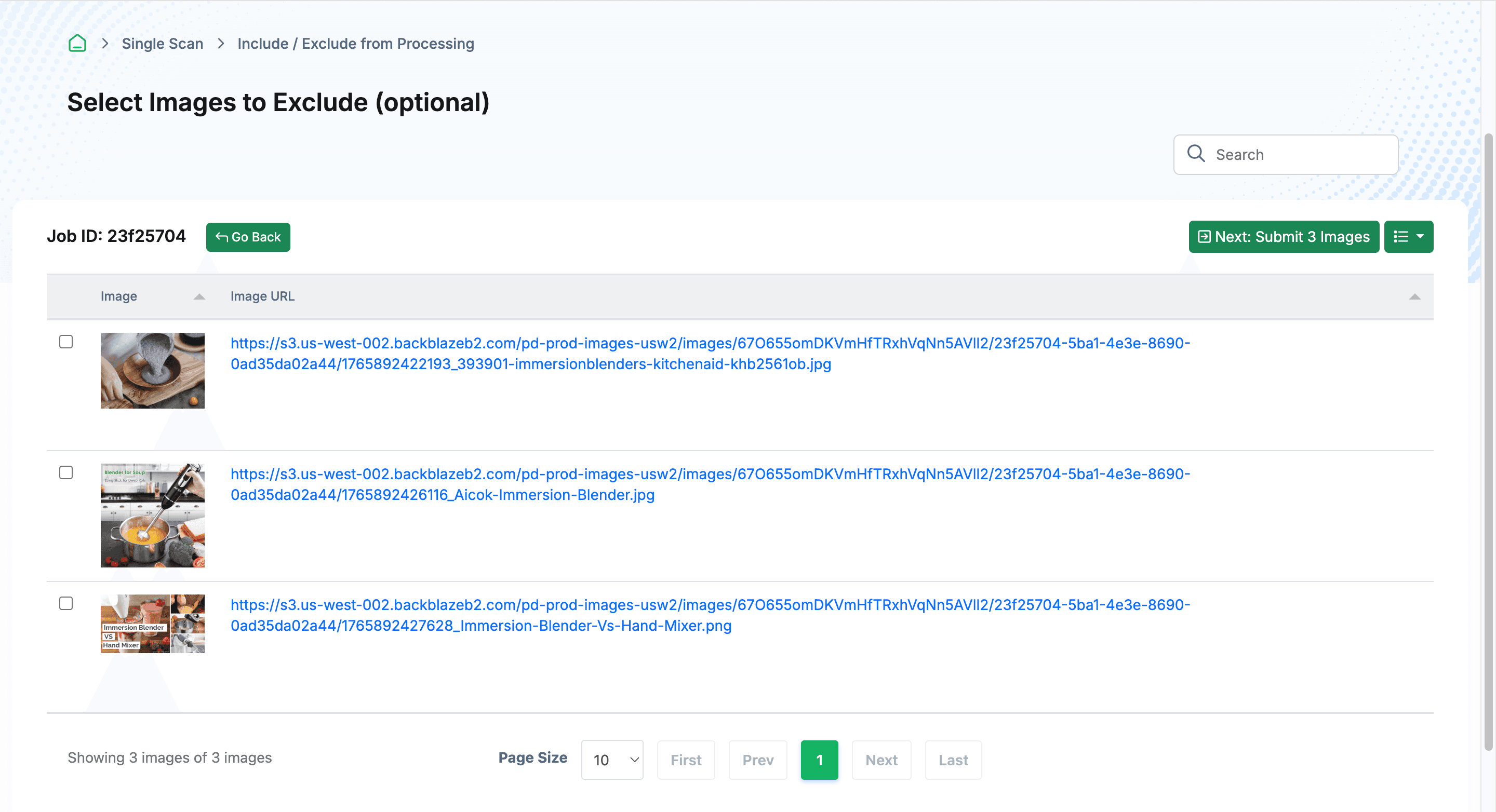
Status updated to
Licensed — Proof Uploaded
Three Steps to Verified Compliance
From unverified asset to documented proof in under two minutes.
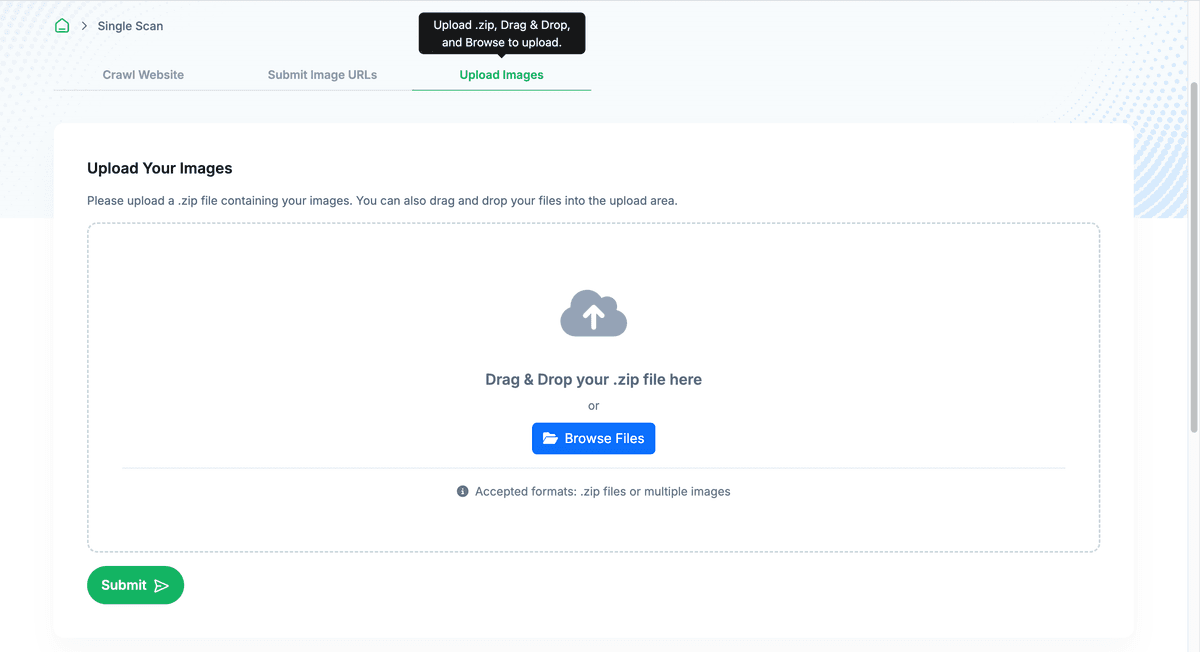
Select Your Assets
Identify images in your inventory that need license documentation.
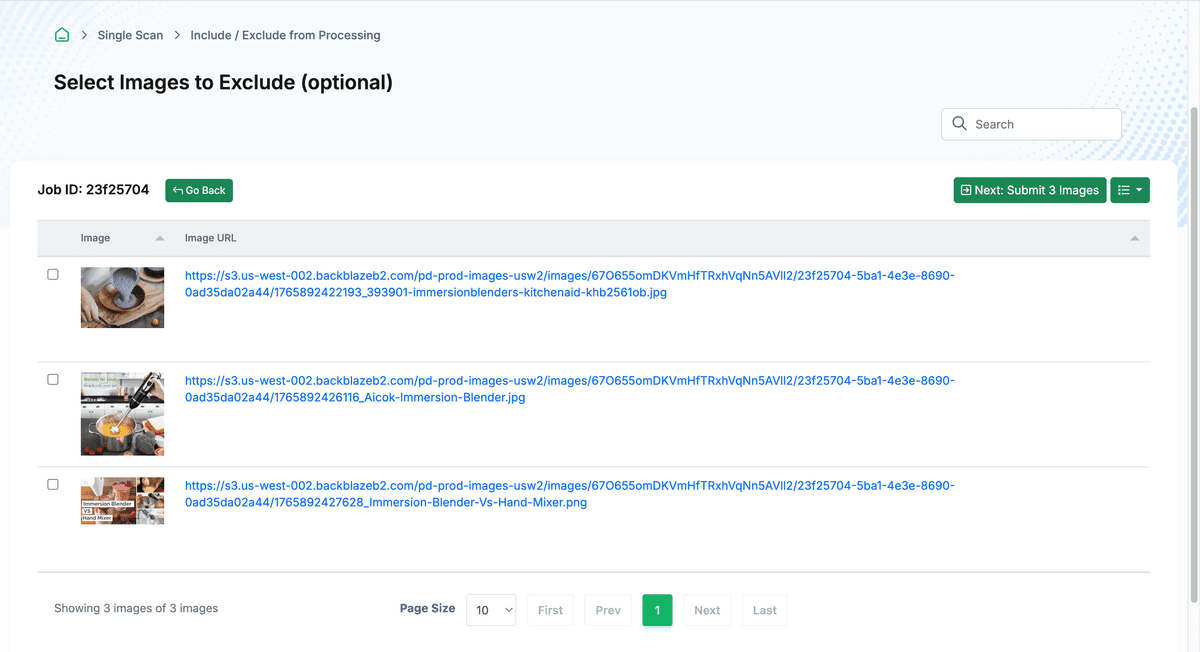
Upload Proof
Attach PDF receipts, license agreements, or free-use term screenshots.
Status Verified
Your compliance status updates instantly. Proof is locked to the record.
Export includes
Forensic Evidence Package
The Defense Kit Export
When a demand letter arrives, you don't have time to dig through years of email receipts. The Proof Vault allows you to instantly deploy your evidence.
One-Click Export
Generate a structured ZIP file or PDF ledger containing your exact image match, the forensic metadata, and the attached license receipt. And because the export honors your active filters, you can hand over exactly the rows you’re reviewing — say, just the high-risk assets — as a CSV, or export the full ledger when you need the complete record.
Ready for Counsel
Hand a professional, organized forensic package directly to your legal counsel or use it to support your response to an automated claim from enforcement agencies.
What's in the Defense Kit?
- ✓Visual Match Confirmation — Exact image comparison proof
- ✓Source Intelligence Report — Origin tracing with risk assessment
- ✓Attached License Proof — Your uploaded receipts and agreements
- ✓Forensic Timestamps — Chain of custody evidence
Spreadsheets vs. System of Record
Most businesses store licensing proof across email threads, Google Drives, and memory. The Proof Vault replaces all of it.
| Capability | Spreadsheets / Google Drive | PicDefense Proof Vault |
|---|---|---|
| Proof linked to specific image asset | × | ✓ |
| Compliance status tracking | × | ✓ |
| Forensic audit trail | × | ✓ |
| One-click Defense Kit export | × | ✓ |
| Multi-user team access | ✓ | ✓ |
| Automated image discovery | × | ✓ |
| Immutable timestamp records | × | ✓ |
Frequently Asked Questions
Common questions about the Proof Vault and compliance documentation.
What file types can I upload as proof?
The Proof Vault accepts PDF receipts, license agreements, PNG/JPG screenshots of free-use terms, and any standard document format. Each file is attached directly to the specific image record it pertains to.
What happens if I lose access to the original license receipt?
That is exactly why the Proof Vault exists. Once uploaded, your proof is stored securely alongside the image record. Even if the original vendor email is lost or the stock site changes their terms, your documentation remains intact in your Vault.
Can multiple team members manage the Proof Vault?
Yes. PicDefense supports team-based workflows. Multiple users can upload proof, update compliance statuses, and export Defense Kits from a shared Vault. Agency partners can manage multiple client Vaults from a single dashboard.
How is the Proof Vault different from a Google Drive folder?
A Google Drive stores files. The Proof Vault links proof directly to specific image asset records, tracks compliance status changes, maintains a forensic audit trail, and generates structured Defense Kit exports. It is a system of record, not a file dump.
Can I share a compliance report with a client or attorney, and is every change tracked?
Yes. You can share a single report with a client, colleague, or outside counsel, and they receive a full editable view rather than a read-only snapshot. Every row-level edit records the editor's email and a timestamp, which you can surface as an optional "Last Modified By" column. Changes also sync live between collaborators, so the report stays current and carries a documented history of who updated each asset and when — reinforcing its role as your system of record. PicDefense stores and structures this documentation; it does not provide legal counsel.
Explore the Full Platform
The Proof Vault is one pillar of the PicDefense Compliance Vault. See how the complete system works together.
Build Your Moat. Prevent Compliance Drift.
Establish your forensic baseline today. Create your master inventory and start attaching your proof before the enforcement bots find your unverified assets.
Legal Disclaimer
PicDefense is a technology platform, not a law firm. The Proof Vault stores your documentation and generates forensic evidence reports. It does not constitute legal advice. If you are unsure of your legal standing regarding a copyright claim, we strongly recommend consulting an Intellectual Property attorney.