Using images without proper permissions can lead to hefty fines, legal headaches, and reputational damage. Did you know copyright infringement fines can reach $30,000 per image in the U.S.? With PicDefense.io, you can simplify compliance. This guide walks you through sourcing, verifying, and documenting images to protect your website.
Key Steps:
- Find Legal Images: Use platforms like Unsplash (free) or Shutterstock (paid). Understand license types (Creative Commons, Royalty-Free).
- Verify Ownership: Check metadata and avoid watermarked images. With PicDefense.io, verify image ownership using its proprietary reverse image search. Unlike basic tools, PicDefense scans your entire site, identifies image origins, and assesses copyright risks with precision.
- Document Licenses: Keep a log of image details, sources, and licenses. Store files securely in cloud backups.
- Automate Compliance: Automate compliance with PicDefense.io. Our proprietary AI scans your website, flags high-risk images, recommends safe replacements, and keeps track of your compliance seamlessly.
- Handle Issues Proactively: Remove flagged images, replace them with licensed ones, and maintain clear records.
Quick Comparison of Stock Image Platforms:
| Platform Type | Examples | Best For | Cost |
|---|---|---|---|
| Free Stock | Unsplash, Pexels | Blogs, small businesses | $0 |
| Premium Stock | Shutterstock, Getty | Commercial projects, marketing | $29-$249/month |
| Rights Managed | Getty Images Premium | Exclusive use, advertising | Custom pricing |
Pro Tip: Keep license details secure and review them quarterly to stay audit-ready. With PicDefense.io, you can streamline this process through automated scans, risk assessments, and compliance tracking.
Can I Use That Picture in My Design? How to Legally Use Copyrighted Images Online
Step 1: Finding Images You Can Legally Use
Using images legally isn't just about avoiding trouble - it's about respecting creators' rights. Start by choosing reliable platforms and understanding how image licenses work.
Step 1.1: Use Reliable Stock Image Platforms
Certain websites make it easy to find images with clear licensing terms:
- Unsplash, Pexels: Offer free, high-quality images for personal or commercial projects. While attribution is appreciated, it’s not mandatory.
- Shutterstock, Getty Images: Paid platforms with a wide range of premium images ideal for professional, commercial use.
| Platform Type | Examples | Best For | Costs |
|---|---|---|---|
| Free Stock | Unsplash, Pexels | Blogs, small businesses | $0 |
| Premium Stock | Shutterstock, Getty | Commercial projects, marketing | $29-$249/month |
| Rights Managed | Getty Images Premium | Exclusive use, advertising | Custom pricing |
Step 1.2: Know the Different License Types
Understanding image licenses is key to staying compliant. Here are the most common types:
Creative Commons Licenses:
- Free to use but may require attribution.
- Some versions restrict commercial use.
- Variations include CC BY and CC BY-SA.
Royalty-Free Licenses:
- Pay once, use multiple times.
- Suitable for personal and commercial projects.
- Usually, no attribution is required.
To ensure compliance:
- Always read and save the license terms.
- Look out for restrictions or attribution rules.
- Use reverse image search tools to confirm authenticity.
- Steer clear of images with unclear licensing or visible watermarks.
Once you've secured the right images, the next step is verifying ownership to ensure everything checks out.
Step 2: Confirming Image Ownership
After selecting the right image, it's crucial to verify ownership to prevent accidental copyright issues.
Check Metadata and Spot Watermarks
Metadata can reveal important details about an image. You can access this information by checking Properties (on Windows) or using Show Inspector (on Mac). Key details to look for include:
- Ownership information and creation date
- Terms of use or restrictions
- Licensing details
Watermarks are another clear indicator of copyright protection. If you see a watermark, the image is likely copyrighted [1]. Removing it is considered a deliberate copyright violation.
Use Reverse Image Search Tools
Reverse image search tools help trace an image's origin, but PicDefense.io goes beyond basic searches to scan entire websites for image compliance risks.
Revised Table:
| Tool | Best Use Case | Key Features |
|---|---|---|
| PicDefense.io | Comprehensive compliance | Reverse Image Search, EXIF info, Bulk scans, PicRisk scores, API integration |
By uploading the image or its URL to PicDefense, you can:
- Identify where the image was first published
- Detect unauthorized uses
- Confirm legitimate sources
"Every image is copyrighted from the moment of its creation unless it falls under specific exceptions such as public domain images" [1]
When verifying, pay attention to:
- The publication date
- The credibility of the website
- How the image is being used and any associated requirements
Just because an image is available online doesn't mean it's free to use. Always confirm the license before proceeding. Once ownership is verified, make sure to document and store the license details securely for future reference.
Step 3: Keeping Records of Image Licenses
Keeping detailed records of image licenses is essential to protect your website from copyright issues. By documenting everything carefully, you create a clear trail that can help you address any legal concerns and stay prepared for audits.
Create a License Log
Set up a digital log to manage all your image licenses. A spreadsheet or database works well for this purpose. Make sure to include these key details:
| Information Category | What to Record | Why It’s Important |
|---|---|---|
| Image Details | Name, description, and location | Helps with quick identification and organization |
| Source Information | Where the image came from (e.g., URL, creator) | Confirms the image was obtained legally |
| License Data | Type of license, purchase date, expiration date | Verifies your rights to use the image |
| Usage Terms | Any restrictions or attribution requirements | Ensures you follow the rules for use |
Organize your images in folders or categories by project, and use consistent naming conventions to make future audits or searches easier. Update the log immediately whenever you add a new image to avoid missing any details.
Securely Store License Files
Keeping your license files safe and accessible is just as important as logging them. Use two storage methods:
- A primary cloud service with automatic backups
- A secondary option like an external drive or another cloud provider for extra security
Pro Tip: Use a clear and consistent naming system for your files, such as ImageID_License_Date, and tag them with keywords like project names or expiration dates to make searching easier.
Make it a habit to review your records every quarter to ensure everything is accurate and up-to-date. With a solid system in place, you’ll be ready to move on to tools that simplify copyright compliance even further.
sbb-itb-59d21f2
Step 4: Tools to Help with Copyright Compliance
Once you've confirmed ownership and documented licenses, you can make compliance easier by using automation tools that reduce manual work.
Use PicDefense.io for Website Scans
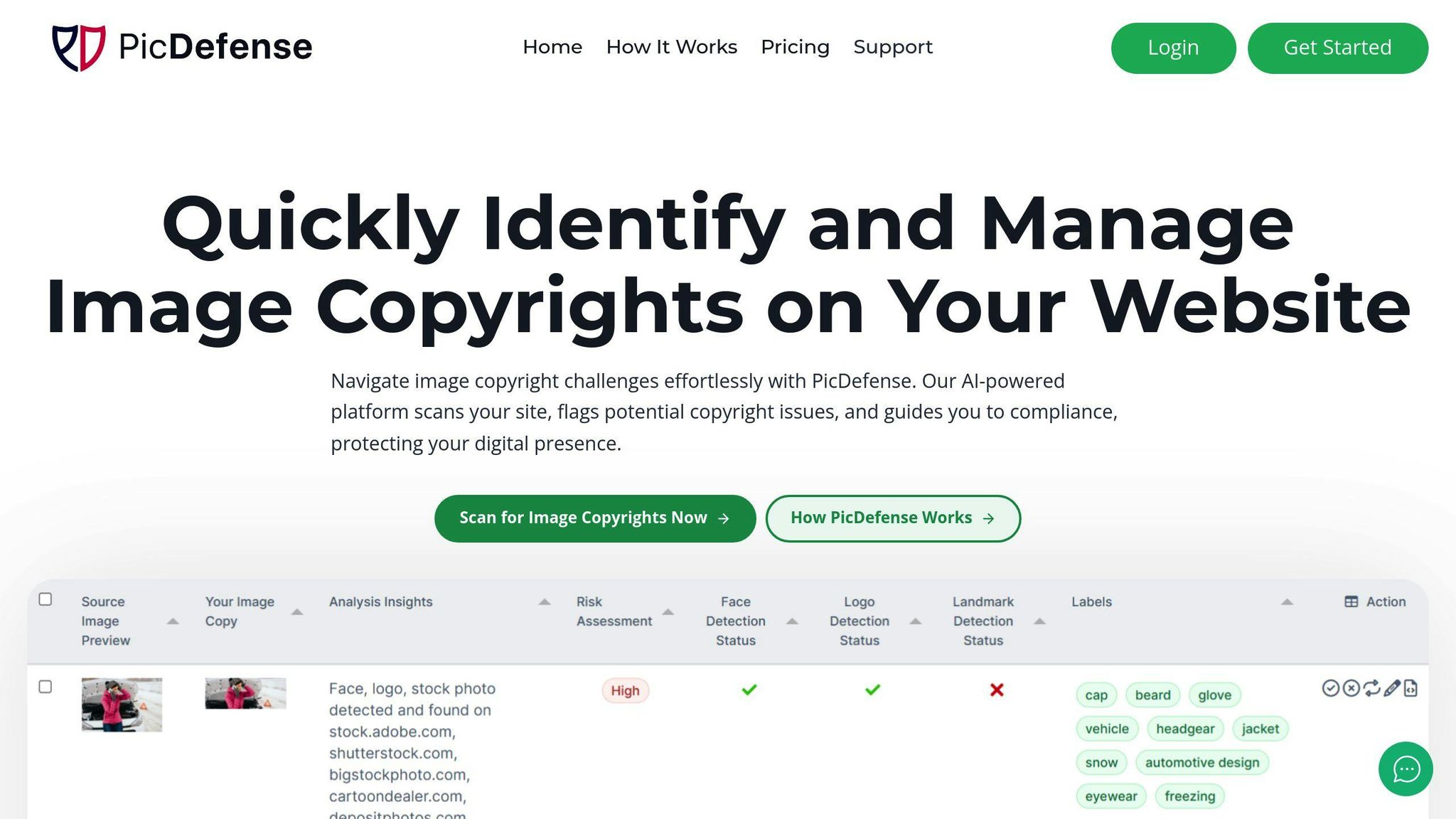
PicDefense.io simplifies monitoring for copyright compliance on your website using AI-based analysis. Here's what it offers:
| Feature | What It Does | Why It’s Unique |
|---|---|---|
| Full-Site Crawling | Builds a complete inventory of your images | Bulk scanning saves hours of manual work |
| Risk Assessment | Flags high-risk images with PicRisk scores | Proprietary algorithm for precision |
| Alternative Suggestions | Finds copyright-safe replacements for flagged images | Integrated with platforms like Pexels |
PicDefense.io doesn’t just flag issues - it also provides practical fixes, like recommending safe image alternatives from platforms such as Pexels.
Integration Options: You can integrate it with WordPress via a plugin, use its API, or automate workflows with tools like Zapier and Make.com.
Other Tools for Managing Risks
Beyond PicDefense.io, there are other tools that can strengthen your compliance efforts:
- Reverse Image Search Tools: While other tools exist, PicDefense.io’s proprietary reverse image search provides unmatched accuracy and bulk-scanning capabilities, helping website owners streamline compliance and manage risks effectively.
- WordPress-Specific Tools: For WordPress users, ImageGuard scans new uploads to catch potential compliance issues before they’re published.
Step 5: Reducing Copyright Risks
Handling Copyright Concerns
Dealing with copyright issues requires proactive steps to keep your website free from legal troubles. Here's a quick guide to managing image compliance:
| Action | Steps |
|---|---|
| Remove Flagged Content | Take down images with unclear ownership. |
| Replace with Verified Sources | Use platforms like Pexels or Unsplash for images. |
| Record License Details | Save license terms and URLs for future reference. |
| Verify Compliance | Confirm commercial usage rights before publishing. |
Pro Tip: Set up a consistent process for replacing images. Always source from trusted platforms, and immediately document license details to ensure your website stays compliant without interruptions.
Fair Use offers limited protections but should be part of a broader copyright strategy. It may apply in these scenarios:
- Educational purposes
- Commentary or criticism
- News reporting
- Limited use, such as short excerpts
"Fair Use is a provision of U.S. Copyright Law that permits use of copyrighted materials without permission under certain circumstances." [2]
Key Reminder: Even if you think your use qualifies as Fair Use, it's smarter to:
- Get clear permission from copyright owners.
- Buy licenses for any commercial use.
- Stick to public domain or Creative Commons images.
- Use a checklist to document your Fair Use evaluation.
Conclusion: Staying Compliant with Copyright Laws
Staying ahead of copyright risks doesn’t have to be overwhelming. With tools like PicDefense.io, you can proactively protect your website and simplify image compliance. Take the first step toward protecting your website today. Sign up at PicDefense.io to automate scans, manage licenses, and reduce copyright risks—your trusted partner for long-term compliance.
Here’s a practical framework for maintaining compliance:
| Compliance Area | Strategy |
|---|---|
| Source Verification | Use reliable stock platforms and reverse image search tools |
| Documentation | Keep detailed license records with a digital asset management system |
| Risk Management | Perform regular site audits and leverage automated scanning tools |
| Monitoring | Schedule routine reviews using compliance software |
Long-term compliance requires careful workflows that prioritize verification at every step. Regular site audits, well-maintained documentation, and automated monitoring tools are essential for reducing risks.
FAQs
How can I tell if an image is copyrighted?
To figure out if an image is copyrighted, start by checking for watermarks or copyright symbols. You can also look at the image's metadata for ownership details or use PicDefense.io’s reverse image search to trace its origins and assess copyright risks comprehensively.Here’s a step-by-step approach:
- Look for watermarks or copyright symbols on the image.
- Check the metadata for any ownership or licensing information.
- Use PicDefense.io’s reverse image search to track the original source, ensuring bulk verification and automated compliance.
- Investigate licensing terms on the platform where the image is hosted.
For the best results, combine these methods. Begin with a visual inspection, then check the metadata, and finally confirm the details with a reverse image search to ensure you understand the image's origin and usage rights.
How can I obtain a commercial license for an image?
Once you’ve verified that an image is copyrighted, you’ll need to secure the proper license for commercial use. Here’s what to do:
-
Choose a source for licensing:
- Use stock image platforms like Shutterstock or Getty Images.
- Contact the creator directly for permission.
- Look for Creative Commons licenses that allow commercial use.
- Carefully review the licensing terms to ensure they align with your intended use, such as commercial projects or modifications.
Stock platforms are a fast and reliable way to get licenses, offering clear documentation and usage rights to keep you compliant.
"Fair Use permits limited use of copyrighted materials for purposes like education, commentary, or news reporting but rarely applies to commercial use."
Each platform has different licensing rules. For instance, Getty Images often requires specific usage declarations, while Shutterstock offers royalty-free licenses that are easier to use for commercial purposes.
Protect your website from image copyright claims
PicDefense scans your entire website, identifies image risks, and stores proof of compliance — so you never get caught off guard.