When you use images online, failing to verify proper licenses can lead to serious legal and financial risks. Copyright laws automatically protect most images, and penalties for infringement in the U.S. can range from $750 to $150,000 per image, plus legal fees. This guide explains how to legally use images online by understanding license types, verifying usage rights, and using tools to streamline compliance.
Key points:
- License Types: Know the difference between royalty-free, rights-managed, Creative Commons, and public domain licenses.
- Manual Checks: Gather purchase receipts, check metadata, and use reverse image searches to confirm ownership.
- Automated Tools: Platforms like PicDefense scan websites, track licenses, and flag risks faster than manual reviews.
- Common Issues: Missing documentation, employee turnover, and improper attribution are frequent problems.
- Solutions: Centralize records, enforce proof policies, and use AI tools to manage risks effectively.
Stock Image License Types Explained
Stock Image License Types Comparison Chart
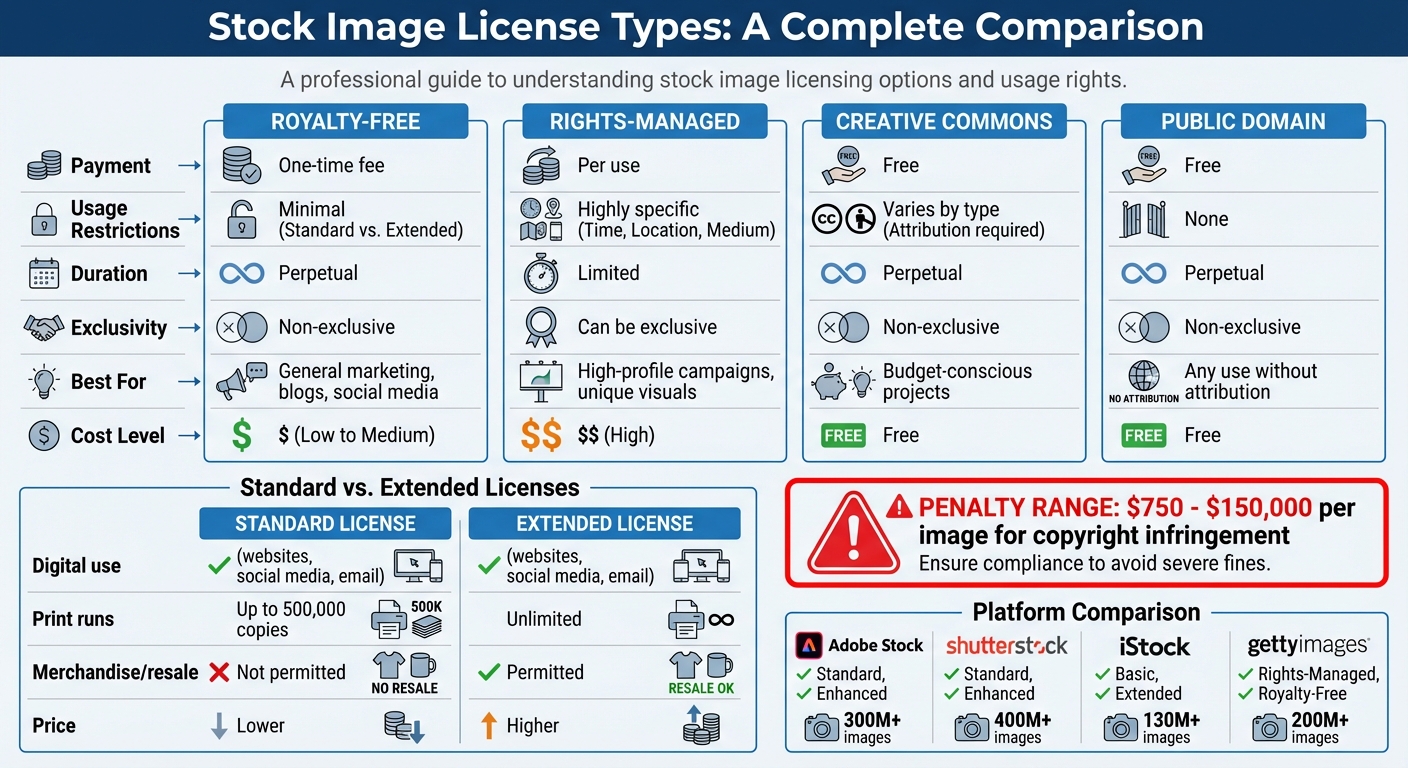
Getting a handle on stock image licenses is essential because a simple mistake can turn an affordable image into a legal nightmare, with fines reaching up to legal nightmare, with fines reaching up to $150,000.50,000. Stock image licenses generally fall into four main categories: Royalty-Free, Rights-Managed, Creative Commons, and Public Domain. Each type comes with its own rules, costs, and usage rights, so knowing the differences is key to staying compliant.
Standard vs Extended Licenses
When it comes to Royalty-Free licenses, most stock image platforms offer two options: Standard and Extended. The choice between the two determines whether you can legally use an image on items for resale.
- Standard licenses are perfect for digital use - think websites, social media, or email campaigns - and allow for limited print runs, typically up to 500,000 copies. Platforms like Adobe Stock and Shutterstock commonly offer these licenses. However, you can't use a standard license for physical products meant for resale, such as t-shirts, mugs, or product packaging. Doing so would violate the terms of the agreement.
- Extended licenses are designed for businesses that need to use images on merchandise or for unlimited print runs. These licenses remove the restrictions of standard licenses but come at a higher price. If your business involves selling physical products, this is the license you’ll need.
| License Type | Payment Structure | Usage Restrictions | Duration |
|---|---|---|---|
| Royalty-Free | One-time fee | Minimal (Standard vs. Extended) | Perpetual |
| Rights-Managed | Per use | Highly specific (Time, Location) | Limited |
| Creative Commons | Free | Varies by type (Attribution, etc.) | Perpetual |
| Public Domain | Free | None | Perpetual |
If you’re planning a large-scale print campaign, it’s crucial to double-check the print run limits in your license. Exceeding 500,000 copies with a standard license, even if the image was legally purchased, is considered infringement. Also, be cautious with images labeled "Editorial Use Only" - these cannot be used in advertising or commercial promotions, a common error that leads to licensing violations [4].
Rights-Managed vs Royalty-Free Licenses
Choosing between Rights-Managed (RM) and Royalty-Free (RF) licenses can significantly impact both your budget and how you use the images.
- Royalty-Free licenses are straightforward: pay once and use the image across multiple projects without additional fees. This type of license is non-exclusive, meaning other businesses can also purchase and use the same image. RF licenses are ideal for general marketing materials like blog posts, social media, or email campaigns, where cost-efficiency and flexibility are more important than exclusivity [4][3].
- Rights-Managed licenses, on the other hand, are much more restrictive. They grant usage for a specific purpose, defined by parameters like time frame, geographic region, medium (print or digital), and audience size. If you need to reuse the image for a different campaign or purpose, you’ll need to buy another license. RM licenses are priced based on these specific details, with high-profile uses often costing significantly more [4][3].
The main advantage of RM licenses is exclusivity. For businesses that want unique visuals, RM agreements can include exclusivity clauses that prevent competitors from using the same image. For instance, Getty Images offers RM licenses tailored for brands that want to ensure their visuals remain exclusive to their campaigns [4].
| Platform | Primary License Types Offered | Collection Size (Approx.) |
|---|---|---|
| Adobe Stock | Standard, Enhanced | 300M+ |
| Shutterstock | Standard, Enhanced | 400M+ |
| iStock | Basic, Extended | 130M+ |
| Getty Images | Rights-Managed, Royalty-Free | 200M+ |
Regardless of the license type, there are universal restrictions to be aware of. You generally cannot resell the image as-is, distribute it to third parties, or use it in a trademark or logo. Many licenses also include "sensitive use clauses", which restrict using images of recognizable individuals in contexts like political endorsements or healthcare advertisements without obtaining additional permissions [3][4].
Up next, we’ll dive into how to manually verify licenses to ensure your business stays on the right side of the law.
sbb-itb-59d21f2
How to Verify Licenses Manually
Manually verifying stock image licenses might be tedious, but it’s a necessary step to ensure you’re legally using images on your website. This process involves tracking down purchase records, examining metadata, and cross-checking dates to create a solid paper trail. Without this, you risk copyright claims that could cost between $750 and $150,000 per image under U.S. copyright law [1].
Find and Organize License Certificates and Receipts
Start by gathering all the documentation tied to your images: purchase receipts, license agreements, stock photo subscription details, and any permission emails from photographers. Missing something? Search your email for download notifications from platforms like Shutterstock or Getty Images, or review credit card statements for relevant transactions. If former employees handled these purchases, check their old email accounts or reach out to them.
If you still come up empty, contact the stock photo agencies directly. Many providers, including Shutterstock and Getty Images, can retrieve past purchase records for images in their catalogs. Once you’ve collected the necessary records, create a centralized inventory to track each image’s details - URL, file name, source, license type, and where the license proof is stored. To prevent future issues, enforce a "Mandatory Proof" policy that requires license documentation before publishing any new image.
"The core issue isn't just about avoiding lawsuits. It's about maintaining professional integrity and respecting the work of creators who depend on proper licensing for their livelihood." – Ivan Jackson, Author [3]
For time-limited or rights-managed licenses, set up renewal reminders at least 60 days in advance. If you can’t find documentation for a particularly valuable image, consider purchasing a new license to ensure legal protection.
Once your records are in order, move on to verifying image details through metadata.
Check EXIF Metadata for Ownership Details
Metadata acts like a digital fingerprint for an image, containing information about its creator and copyright details. The IPTC (International Press Telecommunications Council) metadata fields are especially useful for license verification. Look for fields such as "Author", "Artist", "Copyright", and "Copyright Info URL" to identify the original owner.
You can view metadata using built-in tools on Windows or macOS, or with specialized software like ExifTool or Adobe Bridge for more detailed IPTC data.
"A blank metadata section may indicate deliberate data stripping - a common tactic when images are stolen and reused." – Ivan Jackson, Author [3]
If metadata checks out, the next step is to trace the image’s online footprint using reverse image search tools.
Use Reverse Image Searches
After verifying documentation and metadata, confirm the image’s origins through reverse searches. Tools like TinEye and Google Vision let you upload an image and track where it appears online. TinEye’s "oldest date" filter is particularly helpful, as it often leads you to the image’s original creator or publisher.
Review the search results carefully. If the image shows up on stock photo platforms like Adobe Stock or Shutterstock, match it to your purchase records. If it appears on a photographer’s portfolio or agency site, consider reaching out to confirm licensing. Be cautious if the image is found on multiple sites without attribution - this could indicate unauthorized use or that the image is in the public domain or licensed under Creative Commons.
Cross-Check Purchase Dates with Archive.org
To defend against claims that you used an image before purchasing its license, compare your purchase dates with your website’s historical snapshots on Archive.org’s Wayback Machine. This tool can help confirm that you acquired the image during an active subscription period [2]. If a copyright claim arises, these records can demonstrate your compliance. However, if the dates don’t align, you may need to buy a retroactive license or negotiate a settlement.
Read Your License Agreement Terms
Finally, carefully review the terms of your license to ensure your usage complies with the agreement. Check for any restrictions, such as geographic, time, or media limitations. For instance, a rights-managed license might only cover use in a specific region or timeframe, while a standard royalty-free license could restrict usage on merchandise. Sensitive use clauses are also critical, especially if an image features recognizable individuals. These clauses may require additional permissions for certain contexts. When in doubt, reach out to the stock photo agency or photographer for clarification.
Common License Management Problems
Even when businesses purchase legitimate licenses, proving ownership during copyright disputes can be a major hurdle. One key issue is employee turnover. If team members download images using personal accounts instead of company-wide subscriptions, those licenses often leave with them. This leaves organizations without any record of what was purchased or where to find the documentation [2].
Another frequent issue is inaccessible documentation. Imagine licensing an image three years ago, only to find that the stock photo vendor has since changed platforms, your subscription has expired, or the purchase confirmation email is buried in an ex-employee's inbox. When a copyright claim arises, you’re left scrambling without proof [2].
Missing Receipts and License Files
The most common problem? Missing receipts. Unlike compliance issues that stem from poor organization, legacy files and employee turnover can result in documentation disappearing entirely - often due to factors beyond the company’s control [2].
If you’re dealing with this, your first step should be contacting the stock photo vendor. Companies like Shutterstock or Getty Images can often reissue invoices or license certificates [6]. If that’s not possible, create an internal affidavit. This signed document should include details like the vendor name, purchase date, payment method (e.g., the specific card used), amount paid, and the image’s intended business use [6][7].
When all else fails, check the image’s metadata, such as EXIF or IPTC data, for embedded creator names, copyright details, or URLs that might lead back to the source [3]. If you find an unlicensed image during your audit, post-licensing - buying a retroactive license - can resolve infringement claims more efficiently and cheaply than legal action [8].
Next, let’s look at the challenges of managing license ownership in client projects.
Licenses for Client Projects
Agency work and freelance projects introduce another layer of complexity. When a designer licenses a stock image for a client’s project, the designer - not the client - owns the license [11]. While the client owns the final design, they don’t hold the rights to the individual stock image unless they purchase the license themselves.
This distinction is crucial because most royalty-free licenses are non-transferable. You can deliver the image as part of a finished design, but you can’t legally transfer the license to the client. If the client later wants to reuse the image or modify the design, they’re technically violating the license [11][13].
"The client might own the specific design they paid for, but they do not own the image in it." – Amos Struck, Industry Expert and Founder, StockPhotoSecrets [11]
The simplest solution? Have clients purchase licenses directly and temporarily share them with you for the project. Alternatively, you can buy a multi-seat license that explicitly includes the client [11]. For products intended for resale, like t-shirts or merchandise, standard licenses won’t suffice - you’ll need an Extended license, which costs more but permits commercial resale [11][12]. For agencies juggling multiple team members and projects, multi-seat or enterprise accounts offer comprehensive legal coverage [9].
Now, let’s tackle the challenges of managing images across various platforms.
Managing Images Across Multiple Websites
Tracking image usage across multiple websites can get tricky. Royalty-free licenses are often the best choice here, as they allow perpetual use across platforms like websites, social media, and print for a one-time fee [9][12]. However, single-seat licenses are limited to one user. If multiple team members use the same license across different sites, you’re breaching the terms, which can void your legal protection entirely [9].
"The consequence of using content in breach of the contract is that you don't get the benefit of the license itself. A breach voids the license. It's really just wasting money." – William Clark, Assistant General Counsel in Licensing, Shutterstock [9]
For businesses managing multiple team members, multi-seat or enterprise accounts are essential. While they cost more, they ensure your entire team is legally covered [9]. Another crucial point: don’t overwrite original filenames. Stock images often include unique identification strings in their filenames, which are critical for tracing licensing rights. Renaming these files can make it nearly impossible to verify ownership later [10].
To streamline image management, implement version control. This ensures that when a master file is updated in a centralized system, all linked websites and CMS platforms automatically reflect the changes. This minimizes the risk of using expired or unlicensed images by accident [10].
Automated License Verification Tools
When it comes to verifying image licenses, manual checks fall short - both in efficiency and accuracy. Studies reveal that manual reviews miss around 40% of compliance issues, especially when it comes to images embedded in CSS backgrounds, JavaScript-loaded content, or PDFs. For businesses managing hundreds or even thousands of images across multiple sites, relying on manual processes isn't just inefficient - it’s risky [2].
Automated tools, on the other hand, can scan entire websites in just minutes [1][2]. These systems uncover images that human audits often miss, offering AI-powered risk assessments that replace subjective guesses with data-driven insights. Considering copyright violations in the U.S. can cost anywhere from $750 to $150,000 per image [1][2], the cost of automation is a small price to pay compared to potential legal penalties.
| Feature | Manual Verification | Automated Tools |
|---|---|---|
| Speed | Hours or days per site | Minutes for an entire domain |
| Discovery Range | Visible page content only | Includes CSS, JS, and dynamic content |
| Risk Assessment | Subjective judgment | AI-driven scoring |
| Scalability | Difficult for large sites | Handles thousands of images easily |
PicDefense Website Scanning and Image Inventory
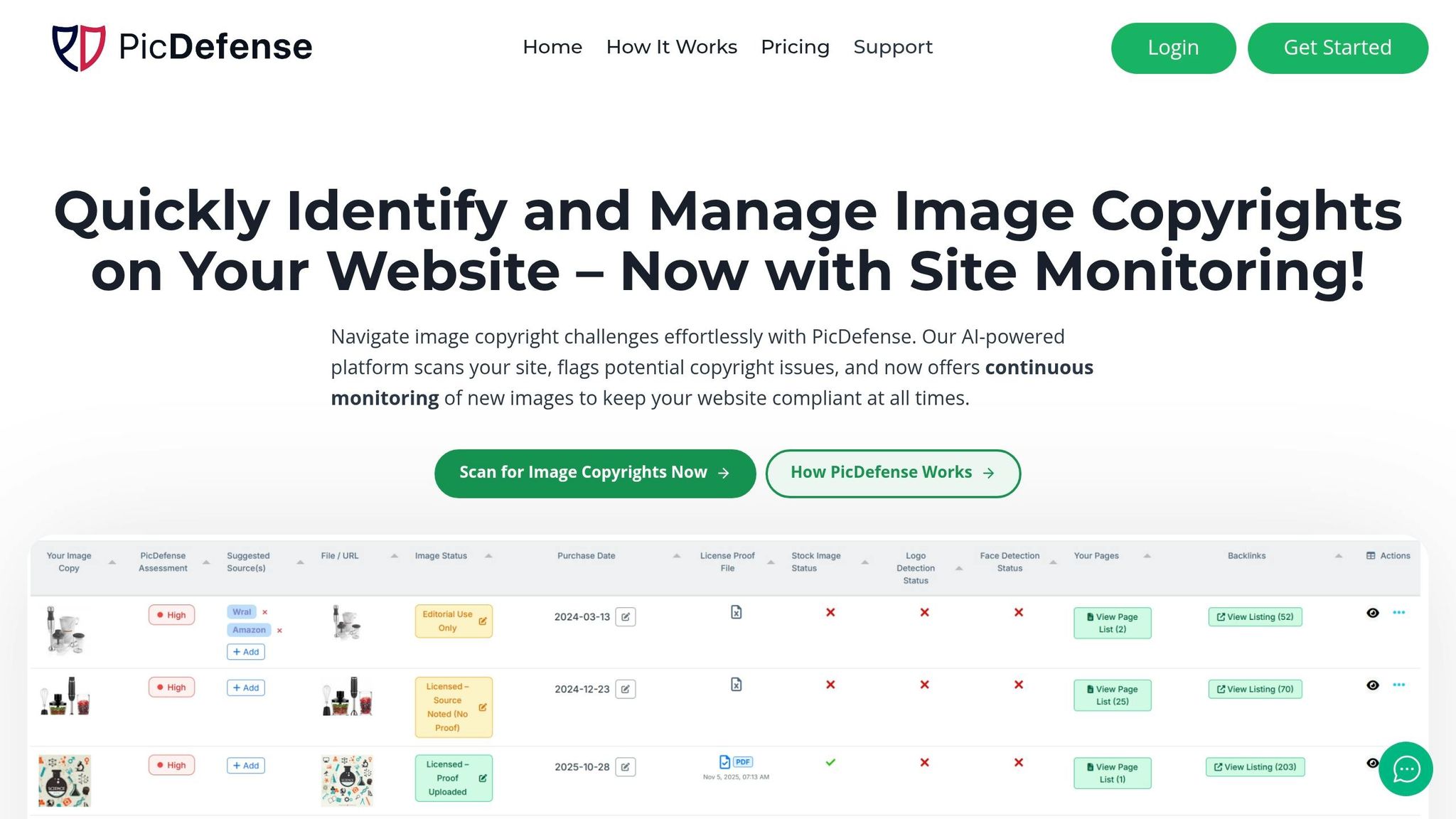
PicDefense, a platform specializing in image compliance and digital asset management, takes automation to the next level. It scans your entire website, creating a comprehensive inventory of all images. Unlike basic scanners, PicDefense identifies assets hidden in CSS stylesheets, JavaScript applications, and even PDFs [2].
This platform doesn’t just stop at detection - it continuously monitors your website for new and existing content, tracking URLs, filenames, and licensing details. This proactive approach eliminates the need for last-minute crisis management, ensuring compliance is maintained at all times. Once the image inventory is complete, the next step involves using AI to assess copyright risks with precision.
AI Risk Analysis and PicRisk Ratings
After cataloging your images, PicDefense leverages AI for a detailed risk analysis. It examines EXIF and IPTC metadata to verify ownership [3], performs reverse image searches using tools like TinEye and Google Vision, and cross-references images against global licensing databases [1][3]. The system also detects faces, logos, and landmarks to flag potential issues.
Each image is assigned a PicRisk rating - an actionable score that helps prioritize which risks need immediate attention. For example:
- High-risk images, such as those with visible watermarks or sourced from premium stock sites without proof of purchase, should be addressed within 24–48 hours [2].
- Medium-risk images, like those from Creative Commons that lack proper attribution, can be resolved within 30 days [2].
This structured, data-driven approach ensures compliance efforts are focused where they’re needed most.
Centralized License Storage Features
One of the standout benefits of automation is the ability to centralize documentation. PicDefense offers a secure repository where you can store all license-related materials, including purchase receipts, certificates, subscription records, and attribution details for every image [2]. It even allows you to log purchase dates, which can be crucial when defending against copyright claims based on archive.org timestamps.
With this centralized system, you’ll have instant, audit-ready access to all necessary documentation. If you ever receive a demand letter, there’s no need to dig through old emails or outdated vendor accounts. Knowing how to handle a demand letter properly can save your business from unnecessary stress. Everything you need to defend your case is right at your fingertips [2]. This level of organization can mean the difference between a quick resolution and an expensive legal battle.
Building a Copyright Compliance System
To avoid copyright claims, it’s essential to establish a system that documents everything upfront. This system acts as your safety net, proving ownership and showing good-faith efforts to stay compliant - whether you’re managing a handful of images or tens of thousands.
The system revolves around three main elements: organized documentation, automated workflows, and audit-ready reports. Together, these components help you prevent copyright disputes and provide a solid defense if one arises. By combining manual checks with AI-powered tools, you can ensure every image is accounted for and protected.
Organizing Documentation and Source Records
The backbone of your compliance system is thorough, centralized documentation. For every image, keep a record of its source, license type, purchase date, and proof of payment.
Here’s what to track for each image:
- License type: For example, Standard vs. Extended licenses.
- Permitted uses: Specify if the license covers web, print, or both.
- Expiration dates: For subscription-based downloads.
- Seat license limits: How many users are covered under the license.
Make sure to link proof of purchase - like receipts or PDF license certificates - to each image record. This ensures you can quickly access them if a dispute arises. It’s worth noting that indemnification coverage varies significantly. For instance, a Shutterstock Standard license covers up to $10,000, while an Enhanced license provides coverage up to $250,000 [14][18].
Regular audits are also essential. Schedule them quarterly to verify your records and document the steps you take in case you ever need to prove due diligence [14][15]. This simple habit can be a lifesaver if a claim ever comes your way.
Setting Up Whitelists and Smart Rules
Relying solely on manual checks won’t cut it as your image library grows. Once your documentation is in place, automation becomes crucial for maintaining compliance effortlessly. Tools like PicDefense’s Smart Rules can streamline this process by integrating with your documentation and ensuring consistent oversight.
Whitelists allow you to tag verified images as safe, automatically excluding them from future risk scans. Once an image’s license is documented and confirmed, it can be added to the whitelist for ongoing peace of mind.
Smart Rules take automation further, enabling you to set specific criteria for flagging potential issues. For instance, you can create rules that:
- Flag images without documented sources.
- Require attribution for Creative Commons images using the TASL format (Title, Author, Source, License) [2][15][16][17].
- Set timelines for addressing violations, such as resolving “High Risk” issues (like unlicensed premium stock images) within 24–48 hours, and “Medium Risk” issues (like missing attributions) within 30 days [2].
For businesses managing multiple websites, tools like PicDefense can monitor license expiration dates and automatically scan for new images. This system integrates directly into your publishing workflow, verifying every image before it goes live [1][2]. With these automated processes in place, the final step is to compile your efforts into compliance reports.
Generating Compliance Reports for Legal Defense
If you ever receive a demand letter, having organized compliance reports can make all the difference. These reports consolidate your documentation into a legal defense, showing that you’ve taken reasonable steps to comply with copyright laws.
PicDefense, for example, can generate exportable reports that include audit trails, detailing image scans, risks identified, and resolutions [2]. These reports can demonstrate good-faith efforts, which may reduce penalties or even eliminate claims of “willful infringement.” The stakes here are high - statutory damages for willful infringement can be as much as $150,000 per image, compared to $750 for unintentional violations [1][2].
A solid compliance report should include:
- A timeline of when each image was scanned.
- Details of identified risks and how they were resolved.
- Proof of ongoing compliance efforts.
For medium-sized websites (100–1,000 images), generate these reports quarterly. For larger sites with over 1,000 images, continuous reporting is recommended [2].
"The core issue isn't just about avoiding lawsuits. It's about maintaining professional integrity and respecting the work of creators who depend on proper licensing for their livelihood." - Ivan Jackson, Author [3]
While you hope you’ll never need these reports, they can be a critical defense when faced with claims - especially from copyright trolls who might dig up old timestamps from archive.org. Having well-maintained records can save you from unnecessary headaches.
Conclusion
Checking stock image licenses isn't just about avoiding lawsuits - it's about safeguarding your business from serious legal and financial setbacks. With statutory damages ranging from $750 to $150,000 per image[1][2] and average litigation costs hitting $1.4 million per case[5], having a structured compliance process is a must. As mentioned earlier, most digital images come with copyright risks, making this issue nearly unavoidable.
The rise of digital content and AI-generated visuals has made ownership verification trickier than ever. Manual audits often miss critical issues, especially those buried in CSS, JavaScript, or dynamic content[2]. That’s why automated tools are no longer a luxury - they’re a necessity.
PicDefense steps in as both a compliance solution and a safety net. It scans entire websites in minutes, uncovering hidden images that manual reviews might miss, and assigns PicRisk scores to help you focus on the most pressing issues. Even better, it creates a centralized database linking every image to its license, purchase receipt, and source attribution - exactly the kind of documentation you’ll need if you ever face a copyright claim.
"The investment in proper copyright checking tools far outweighs the potential costs of infringement violations." - WebCopyrightChecker[1]
FAQs
What proof should I keep for every stock image?
To keep things organized and protect yourself from potential copyright issues, it's important to maintain detailed documentation for every stock image you use. This should include:
- Proof of license agreements: Keep a copy of the license that shows you have the right to use the image.
- Receipts and purchase records: Store records of when and where you purchased the image.
- Source attribution: Document the original source of the image.
- License files: Save any files that outline the terms of the license.
- Purchase dates: Record the exact dates of purchase.
These records should clearly outline the licensing terms. That way, if a dispute or copyright claim arises, you'll have everything you need to resolve it quickly.
How do I know if I need a Standard or Extended license?
Deciding whether to go with a Standard or Extended license boils down to how you intend to use the image. A Standard license typically works for personal projects, websites, or small-scale commercial purposes. On the other hand, an Extended license is necessary for larger-scale uses, such as creating merchandise, running major advertising campaigns, or anything involving resale.
It's essential to carefully review the licensing terms to understand the rights and restrictions. This helps ensure your project stays within the rules and avoids any potential legal complications.
What should I do if I can’t find an image’s license?
If you can’t determine an image’s license, it’s best to steer clear of using it to avoid any copyright troubles. To verify its rights, you can try a few approaches like running a reverse image search, analyzing metadata with tools such as PicDefense, or browsing trusted image databases. If you’re still unsure about the licensing, stick to images that are clearly marked as copyright-free or properly licensed. Alternatively, consider sourcing new, licensed visuals to eliminate any legal risks.
Protect your website from image copyright claims
PicDefense scans your entire website, identifies image risks, and stores proof of compliance — so you never get caught off guard.