Want to avoid copyright headaches and legal threats? Compliance templates are a great starting point—but they’re not enough on their own. The real protection comes from combining templates with automated tools like PicDefense.io, which continuously scan your site, flag risks, and help you document licenses and permissions.
Here’s what you’ll learn:
- What to include: Essential legal components—like copyright notices, usage rules, and DMCA procedures.
- Why templates alone aren’t enough: Learn how to combine them with proactive tools for real protection.
- How to automate compliance: Use PicDefense.io to monitor image use, assess risk, and attach license records.
- When to update: Keep templates current with evolving laws and re-scan your site regularly for new issues.
Quick Tip: Don’t just upload legal templates and forget them. Pair them with active monitoring from PicDefense.io to make sure the content on your site actually aligns with what your templates claim to protect.
Lawyer's Guide to Protecting Your Business Legally
Required Template Components
Here’s how to ensure your copyright templates meet legal standards and stay compliant.
Basic Legal Requirements
To align with U.S. copyright law, include these essential elements:
- Copyright Notice: Use the © symbol, the year of first publication, and the rights holder's name.
- Usage Terms: Clearly outline what is and isn’t allowed, avoiding vague phrases like "all rights reserved."
- License Details: Specify the type of license and any restrictions.
- Contact Information: Provide clear methods for handling permission requests and inquiries.
Once these basics are covered, move on to DMCA-specific elements.
DMCA Requirements
For compliance with the DMCA, your templates should include:
- Copyright Agent Details: Include the name and contact information of the copyright agent.
- Takedown Procedures: Clearly explain the steps for submitting copyright complaints.
- Counter-Notice Process: Provide instructions for disputing takedown notices.
- Repeat Infringer Policy: Define how recurring violations will be addressed.
Tools like PicDefense.io can simplify DMCA compliance by automating parts of the process. After addressing DMCA needs, tailor your templates to fit your business.
Template Modifications
Adjust templates depending on your business type with these considerations:
| Business Type | Required Modifications | Special Considerations |
|---|---|---|
| E-commerce | Product image rights | Rules for user-generated content |
| Blog/Media | Republishing terms | Fair use policies |
| Business Website | Logo and branding protection | Employee content guidelines |
For effective template management:
- Document all modifications with dates and keep records of licenses and permissions.
- Maintain an audit trail for any changes.
- Regularly review and update terms to stay current.
Pro Tip: Static templates can't prevent copyright claims—but PicDefense.io can. It scans your site, flags high-risk images, and lets you whitelist licensed content, helping you back up your Terms of Use with real enforcement.
sbb-itb-59d21f2
Required Website Templates
Terms of Use Template
Templates lay out your rules—but tools like PicDefense.io ensure your content actually follows them. Don’t assume a disclaimer alone will protect you if your image use isn’t properly documented or monitored.
This template should outline who owns the content on your site, how it can be used, and the steps taken to protect it. Key elements to include:
- A statement declaring content ownership
- Clear guidelines on usage limitations
- Rules for user-generated content
- Specific restrictions on licensing
- Detailed terms for image use
"After receiving a surprise copyright demand letter, I turned to PicDefense. Their detailed scans and reports made it easy to identify and address potential issues proactively. It's an essential service for any site owner looking to avoid costly legal troubles." - Diana Foster, Owner, Foster Web Solutions [1]
Don't forget to also cover data protection and copyright matters in your Privacy Policy.
Privacy Policy Template
Your Privacy Policy should address copyright-related issues, including:
- Policies for managing image rights
- Protocols for content storage
- Methods for tracking licenses
Additionally, make sure to outline how copyright complaints will be handled in your DMCA Notice.
DMCA Notice Template
This template should include:
- Agent Information: Contact details for the designated copyright agent
- Submission Requirements: What users need to provide when filing a complaint
- Response Timeline: Expected timeframes for addressing complaints
- Counter-Notice Process: Steps for responding to counterclaims
"PicDefense is a lifesaver. They helped me navigate the aftermath of a copyright demand letter with their thorough image scanning and risk analysis. I can't recommend them enough for anyone who wants to stay compliant and secure." - Michael Thompson, Co-Founder, Trending Topics Media [1]
Lastly, ensure proper attribution for all images using an Image Credit Template.
Image Credit Template
This template should include the following details:
- The creator's name
- The source of the image
- The type of license
- Any usage restrictions
"Receiving a copyright demand letter was a wake-up call, but thankfully, PicDefense made it easy to audit and clean up our image library. Their precise risk analysis gives peace of mind that we're on the right side of the law." - Stephanie Clarke, Online Marketing Manager [1]
Pro Tip: Keep a record of all image sources and licenses in your content management system. Tools like PicDefense.io can help automate this process and ensure you remain compliant.
Template Management Steps
Adding Templates to Websites
Make sure your legal templates are easy to find on your website. Consider placing them in these key areas:
- Footer navigation: Add links for Terms of Use and Privacy Policy.
- Main menu: Include a section for dedicated legal pages.
- Beneath relevant images: Use image credit templates where necessary.
- Legal section: Place DMCA notices here.
For WordPress users, tools like the PicDefense.io plugin can simplify the process by automating the addition and updates of these sections. It's also a good idea to schedule regular reviews to keep your templates up to date with any legal changes.
Template Update Schedule
Set up a schedule to review and update your copyright compliance templates. Here's a helpful guide:
| Template Type | Review Frequency | Update Triggers |
|---|---|---|
| Terms of Use | Quarterly | Changes in laws or services |
| Privacy Policy | Bi-annually | Updates to data handling or regulations |
| DMCA Notice | Annually | Changes to agents or procedures |
| Image Credits | Monthly | New content added to the site |
Copyright Management Tools
Using the right tools can make managing copyright templates much easier. PicDefense.io doesn’t just help manage templates—it actively enforces them. With automated scanning, license tracking, and integration options, it gives you proof that your website’s image use aligns with your Terms of Use and DMCA policies.PicDefense.io, for instance, offers features tailored for this purpose:
- Automated Scanning: Scans your entire site to create a list of images needing credit templates.
- Risk Analysis: Uses AI to spot images that need immediate updates or replacements.
- Integration Options: Works seamlessly with WordPress and APIs to fit into your existing workflow.
Pro Tip: Combine tools like PicDefense.io with automation platforms such as Make.com and Zapier. This setup can flag images needing updates, notify your team about template reviews, and keep your process running smoothly.
Summary and Next Steps
Key Takeaways
Templates give you a legal framework, but they don’t protect you from surprise demand letters or missing license records. That’s where PicDefense.io comes in—with tools that make your compliance policy actually enforceable.
Protecting your website with copyright compliance templates is crucial. Here's a quick breakdown of what to keep in check:
| Template Type | Key Requirements | Update Frequency |
|---|---|---|
| Terms of Use | Usage rights, limitations, ownership | Quarterly |
| Privacy Policy | Data handling, user rights | Bi-annually |
| DMCA Notice | Agent information, takedown procedures | Annually |
| Image Credits | Attribution, license details | Monthly |
Ensure these templates are easy to find on your site and updated regularly. Now, let’s look at how PicDefense.io can take your compliance efforts to the next level.
How PicDefense.io Helps
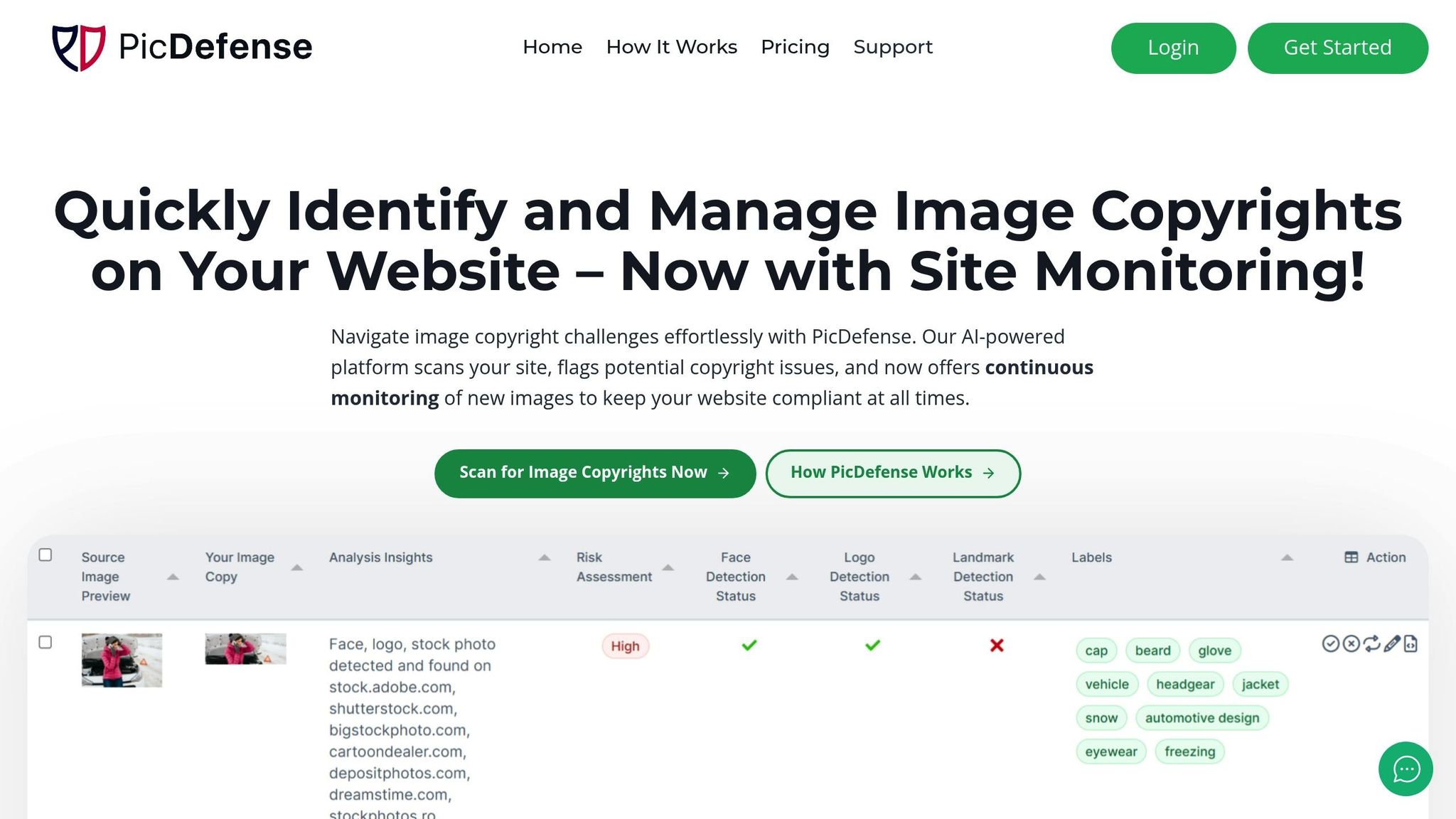
Your templates say you're compliant—PicDefense.io helps prove it. From scanning your entire site to tracking license records and risk levels, PicDefense gives you everything you need to make sure your real-world content matches your legal documents.
PicDefense.io simplifies copyright management by automating key processes and providing valuable tools. Here’s what it brings to the table:
- Image Inventory Management: Keeps a detailed catalog of your images, tracks licenses, and records sources.
- Risk Assessment Tools: Analyzes EXIF data, runs reverse image searches, and assigns risk scores you can act on.
- Automation Options: Works seamlessly with WordPress via a plugin, offers API access, and integrates with tools like Zapier and Make.com.
Legal templates are only as strong as your ability to enforce them. PicDefense.io helps you connect policy with action—so your site stays protected, compliant, and audit-ready at all times.
Protect your website from image copyright claims
PicDefense scans your entire website, identifies image risks, and stores proof of compliance — so you never get caught off guard.