Using website images without the right permissions can lead to serious legal risks—including fines of up to $150,000 per image, takedown notices, or even lawsuits. This FAQ breaks down how to use images legally, avoid copyright traps, and protect your content with smart tools like PicDefense.io. Here’s what we’ll cover:
- What is protected by copyright: Understand what kinds of visual content are automatically protected under U.S. law.
- Where to find legal images: Explore safe platforms like Pixabay and Unsplash—and learn why tools like PicDefense.io still matter.
- Fair Use explained: Know when limited use is allowed—and why it’s not a legal free pass.
- How to proactively avoid image risks: Use PicDefense.io to scan your site, identify risks, and keep documentation audit-ready.
- How to respond to copyright claims: Learn how to handle DMCA notices, protect yourself, and document your image rights.
Quick Comparison of Free Image Platforms
Sites like Pixabay, Unsplash, and Pexels offer free images for commercial use, but that doesn’t mean you’re immune to copyright claims. Licensing terms can change, and some contributors upload copyrighted content by mistake. That’s why we recommend pairing these platforms with PicDefense.io, which scans your site and flags any high-risk or misattributed images.
Here’s a quick side-by-side of the most popular free platforms. Just remember: even “free” doesn’t always mean risk-free.
| Platform | Content Type | License Type | Attribution Required | Commercial Use |
|---|---|---|---|---|
| Pixabay | Images, videos, music | Pixabay License | No | Yes |
| Unsplash | High-res photos | Unsplash License | No | Yes |
| Pexels | Stock photos, videos | Pexels License | No | Yes |
Image Copyright Fundamentals
What Copyright Protects
Copyright protection kicks in the moment an original image is created—no registration required. That includes photos, illustrations, logos, digital artwork, and more. Just because you find an image online doesn’t mean it’s safe to use.
PicDefense.io helps you uncover whether an image is potentially copyrighted, even if it’s been edited, reuploaded, or taken from a “free” source without proper permission..
Here’s what copyright grants:
- Reproduction rights: Control over copying the image.
- Distribution and display rights: Decide how and where the image is shared or shown.
- Derivative works: The authority to create new works based on the original.
- Licensing and sales: The ability to sell or license usage rights to others.
"Copyright is the right of the author of the work or the author's heirs or assignees, not of the one who only owns or possesses the physical work itself." - U.S. Copyright Office [3]
Copyright protects the expression of an idea, not the idea itself. For example, while you can't replicate someone else's photo of the Golden Gate Bridge, you're free to take your own photo of the same landmark. Now, let’s dive into how long these protections last.
Copyright Duration
In the U.S., most images are protected for decades—often long after the creator has passed away. That’s why using “older” images isn’t a safe shortcut unless you confirm they’re truly in the public domain.
Use tools like PicDefense.io to verify license status, detect red flags, and document your findings in case of future disputes. Here’s a breakdown:
| Work Type | Copyright Duration |
|---|---|
| Individual Creator (post-1978) | Life of author + 70 years |
| Anonymous/Corporate Works | 95 years from publication or 120 years from creation (whichever is shorter) |
| Pre-1930 Works | Public domain |
| Works Published 1930-1963 with Notice and Renewal | 95 years from first publication |
Images created after January 1, 1978, are protected for the creator's lifetime plus 70 years [4].
Types of IP Protection
Not all legal issues around images come down to copyright. Logos, for example, may also be protected by trademark law, and certain technologies (like image filters) could fall under patents. Still, copyright is the most common—and the most risky—issue for website owners.
That’s why tools like PicDefense.io focus on scanning for copyright violations, but also flag images that may contain brand logos, watermarks, or embedded metadata tied to known enforcement programs.
When dealing with images for websites, it’s important to understand these forms of intellectual property (IP) protection:
Copyright Protection
- Automatically applies to artistic works upon creation and lasts for the creator's life plus 70 years.
Trademark Protection
- Protects logos and brand identifiers indefinitely, as long as they’re registered and actively used.
Patent Protection
- Covers technology used in image creation or processing for up to 20 years [5].
For most website images, copyright is the main concern. However, logos often involve trademark issues too. For example, using Nike's swoosh logo without permission could infringe both copyright (as an artistic design) and trademark (as a brand symbol).
These protections can overlap. A single logo might fall under both copyright and trademark laws, so it’s crucial to approach such usage carefully.
Legal Image Sources and Usage
Free Image Resources
Free image platforms like Pixabay and Unsplash offer beautiful visuals under generous licenses—but they’re not foolproof. Some contributors upload copyrighted or stolen content by accident. If you use that image, you could still be held responsible.
That’s why we recommend scanning even “free” images with PicDefense.io. It compares images against billions of copyrighted works and flags potential risks before they become problems.
Here’s a quick comparison of some popular free image resources:
| Platform | Content Type | License Type | Attribution Required | Commercial Use |
|---|---|---|---|---|
| Pixabay | Images, videos, music | Pixabay License | No | Yes |
| Unsplash | High-res photos | Unsplash License | No | Yes |
| Pexels | Stock photos, videos | Pexels License | No | Yes |
Next, let’s take a look at Creative Commons (CC) licenses, which outline rules for using copyrighted works.
Types of CC Licenses
Creative Commons licenses provide clear terms for using creative works while respecting the rights of creators [7]. Each license type has specific rules about usage, modifications, and sharing.
Here’s an overview of the six main Creative Commons licenses:
| License Type | Commercial Use | Modifications | Share-Alike | Key Requirements |
|---|---|---|---|---|
| CC BY | Yes | Yes | No | Attribution only |
| CC BY-SA | Yes | Yes | Yes | Attribution + same license |
| CC BY-ND | Yes | No | No | No modifications |
| CC BY-NC | No | Yes | No | Non-commercial only |
| CC BY-NC-SA | No | Yes | Yes | Non-commercial + same license |
| CC BY-NC-ND | No | No | No | Most restrictive |
"You may satisfy the attribution requirement in any reasonable manner based on the medium, means, and context in which the Licensed Material is used." - Creative Commons [8]
Let’s explore how to give proper credit when using such licensed images.
Image Attribution Rules
When using Creative Commons images, attribution isn’t optional—it’s required. Here’s what you should include with each image:
- Image title
- Creator’s name
- Source URL
- License type
- Notations for any edits
If you’re using PicDefense.io, you can add these details directly into your image dashboard. The platform lets you whitelist safe images, attach attribution notes, and stay audit-ready in case of a claim.
If you modify a CC-licensed image, make sure to clearly note the changes. For example:
"Sunset at Golden Gate" by John Smith (Pixabay), color-adjusted and cropped, used under Pixabay Content License.
PicDefense makes it easy to log attribution details like this and ensure they stay tied to each image you manage.
Avoid using images if you cannot verify the owner or license type [9]. When unsure, reach out to the copyright owner to request permission and clarify attribution requirements.
Preventing Copyright Issues
Fair Use Guidelines
Fair Use is a legal concept that allows limited use of copyrighted material without permission, but it’s not a catch-all solution. Each case is judged individually based on four key factors:
- Purpose: Is the use educational or nonprofit, or is it for commercial purposes? For instance, using an image for a news article is different from selling merchandise featuring that image.
- Nature: Is the original work factual or artistic? A documentary photo may be treated differently than a creative or artistic photograph.
- Amount: How much of the work is being used? For example, using a small, low-resolution thumbnail might be more permissible than using a full-resolution image.
- Market Effect: Does the use harm the original work’s market potential? For example, using a paid stock image without permission could impact its value, while transformative use may not.
Instead of relying on Fair Use as a defense, it’s safer to obtain proper licensing or use alternative images.
Next, let’s look at how sourcing images from Google Images can lead to additional risks.
Google Images and Copyright
Google Images is a search engine—not a license database. Even with usage filters, many images are still copyrighted. Relying on these filters can lead to false confidence and legal exposure.
Instead, use PicDefense.io to verify if images on your site pose copyright risks—even if they were sourced from seemingly “safe” places.. To reduce risks when using Google Images:
- Click on 'Tools' after performing a search.
- Select "Usage Rights" from the dropdown menu.
- Choose either "Creative Commons licenses" or "Commercial & other licenses".
- Always double-check the license details on the original source website.
Remember, finding an image on Google doesn’t automatically grant you the right to use it. Additionally, even if an image isn’t copyrighted, other restrictions like trademarks, privacy, or publicity rights might still apply. Always confirm and follow the licensing terms.
For a more secure approach, consider automated solutions like PicDefense.io.
Using PicDefense.io for Protection
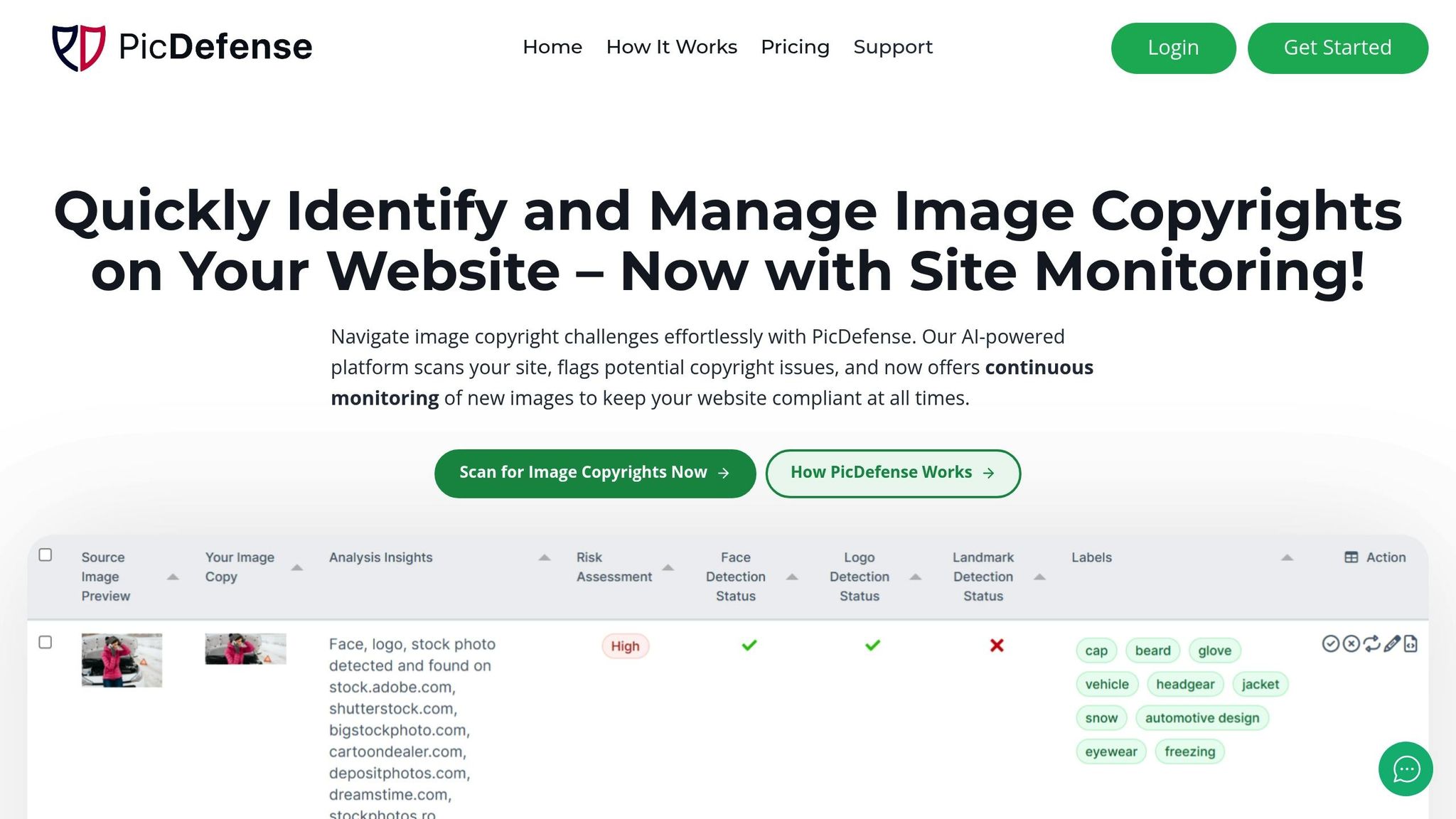
PicDefense.io is an AI-driven platform designed to help manage image copyright risks. It scans your website for potential issues and provides actionable steps to address them. Here’s what it offers:
- Automated Site Scanning: The platform crawls your website weekly, comparing images against a database of over 73 billion images to flag possible copyright concerns.
- Risk Assessment Reports: Each image gets a risk score along with specific recommendations, helping you document licenses and decide when to replace or remove problematic images.
- Continuous Monitoring: For $30/month, the service includes 150 image analyses per month, with unused credits rolling over.
PicDefense.io is available as a web-based tool for public images and as a WordPress plugin for managing your Media Library. By using PicDefense.io to document licenses and address flagged issues quickly, you can reduce the risk of costly copyright claims and keep your website legally compliant [10].
sbb-itb-59d21f2
Resolving Copyright Claims
Responding to DMCA Notices
If you receive a DMCA takedown notice, it means someone has claimed that content on your website infringes on their copyright, and the material has been removed [11]. Act quickly and check that the notice includes the following:
- A signature from the copyright owner
- Details about the copyrighted work
- Information about the alleged infringement
- Contact details of the claimant
- A statement confirming no permission was given
- A declaration of accuracy [12]
If you receive a DMCA takedown, act fast. If the claim is valid, remove the image. If not, file a counter-notice—but only if you’ve documented your usage rights.
PicDefense.io keeps a record of licenses, attributions, and risk history, helping you respond with confidence instead of panic.
Keep detailed records of your rights to avoid future legal complications.
Documenting Image Rights
Properly documenting image rights is crucial for defending against copyright claims. Tools like PicDefense.io can help you maintain organized records, but you should also take these steps:
- Secure written agreements for any outsourced creative work, such as photography or design [2].
-
Maintain a database that includes:
- Original purchase receipts
- License agreements
- Usage terms
- Attribution requirements
- Communication with copyright holders
Having these records on hand can save you from costly legal issues.
Copyright Violation Penalties
Understanding the penalties for copyright infringement highlights the importance of proper licensing and documentation. Here’s a breakdown of potential consequences:
| Violation Type | Penalty Range | Extra Costs |
|---|---|---|
| Standard Infringement | $750 - $30,000 per work | Attorney fees, court costs |
| Willful Infringement | Up to $150,000 per work | Attorney fees, court costs |
| Criminal Violations | Up to $250,000 fine | Possible 5-year imprisonment |
To avoid these penalties, always assume that online images are protected by copyright. Verify your rights before using any content. Tools like PicDefense.io’s automated scanning and risk assessment system can help you identify potential risks early [1].
How to LEGALLY Use a Copyrighted Photo
Copyright Management Software
Effective software solutions are key to strengthening your copyright compliance strategy, complementing efforts to prevent infringement.
PicDefense.io Features
PicDefense.io uses AI-driven tools to protect copyrights through scanning and monitoring. Here’s a look at its main features:
| Feature | Description | Benefit |
|---|---|---|
| Full-Site Scanning | Crawls entire websites to catalog images | Builds a complete image inventory |
| AI Analysis | Compares against 67.1 billion images | Detects potential copyright issues |
| EXIF Analysis | Reviews embedded image metadata | Tracks image origins and rights |
| Continuous Monitoring | Weekly automated scans | Maintains ongoing compliance |
| Risk Scoring | Provides clear risk metrics | Helps prioritize necessary actions |
The Site Monitoring service is priced at $30/month for 150 image analyses, with extra scans costing $0.15 each. This makes it a practical choice for small to medium-sized websites [10].
"PicDefense is an AI-powered image copyright checker that helps website owners, bloggers, and businesses identify potentially copyrighted images before they become a legal risk." – PicDefense.io [10]
Let’s explore additional tools that expand on these core features.
Other Copyright Tools
PicDefense.io also offers supplementary tools that enhance its copyright management capabilities:
| Tool Type | Primary Function | Best For |
|---|---|---|
| Web Scanner | Scans all public images | Comprehensive site analysis |
| WordPress Plugin | Scans the Media Library | Managing WordPress Media Libraries |
| API Access | Custom integration | Advanced automation needs |
| Zapier Integration | Workflow automation | Multi-platform management |
The web scanner reviews all publicly accessible images, while the WordPress plugin focuses on Media Library content [10].
For agencies managing multiple websites, specialized solutions are available.
PicDefense.io for Agencies
PicDefense.io for Agencies offers tailored solutions for managing copyright compliance across multiple sites:
- API access for custom integrations
- Bulk scanning options
- Weekly monitoring
- Detailed reporting tools
- Client-specific whitelisting capabilities
Pricing for volume-based scanning starts at $75 for 500 images, making it a cost-effective choice for agencies handling multiple clients [10].
"Site Monitoring is PicDefense's automated solution that continuously scans your website for newly added images, helping you stay copyright-compliant over time." – PicDefense.io [10]
These flexible tools work hand in hand with earlier practices to ensure consistent copyright protection.
Summary
Here's a quick recap of the strategies to help you steer clear of copyright issues with your website's images.
Key Practices
To protect your images, stick to a clear copyright management plan. Here's what to focus on:
| Aspect | Guidelines | Tips for Implementation |
|---|---|---|
| Image Sourcing | Use images responsibly | Keep records of usage rights |
| Copyright Notices | Add clear notices on all pages | Include the year and ownership info |
| Technical Protections | Use security measures | Add watermarks and disable right-click |
| Monitoring | Perform regular checks | Automate scans for compliance |
By following these practices, you can safeguard your website and avoid unnecessary risks.
Steps to Take
To secure your images right away, follow these steps:
- Initial Assessment : Start by scanning your site with PicDefense.io. It identifies risky images, documents safe ones, and gives you a complete picture of your copyright exposure—starting at just $20.
- Set Up Protection Invest in ongoing monitoring with PicDefense.io's Site Monitoring service. For $30/month, you can analyze up to 150 images regularly, ensuring you're alerted to potential copyright issues as they arise [10].
- Organize Your Records Create a detailed system to track image licenses, attributions, and any rights documentation. Keeping everything organized will simplify compliance.
-
Create a Response Plan
Develop clear protocols for handling copyright-related issues, including:
- Managing DMCA notices
- Addressing copyright claims
- Documenting all compliance efforts
- Maintaining communication records
Proactively managing your website's images can save you from costly legal troubles. A little effort now can prevent big headaches later. Regular checks and detailed documentation are your best defense.
Protect your website from image copyright claims
PicDefense scans your entire website, identifies image risks, and stores proof of compliance — so you never get caught off guard.